



A professional profile photo doesn't prove competence, even when viewers read it that way. A peer-reviewed comparison in the Online Journal of Communication and Media Technologies found that LinkedIn profiles with pictures received higher ratings for perceived competence and social attractiveness than profiles without them. That's evidence about perception, not proof of ability. We treat the photo as a recognition tool first and a flattering portrait second.
Table of Contents
- Why recruiters judge your photo in seconds
- LinkedIn specs, framing and background
- Lighting and expression that signal credibility
- Mistakes that weaken a professional profile photo
- Bias, accessibility and consistency for corporate teams
- Choose your route and upload your first set
Why recruiters judge your photo in seconds
A professional profile photo works when the viewer can identify you immediately. File quality, framing, lighting, expression and background determine whether that recognition is easy.
A 2012 TheLadders eye-tracking study, described in Starkie's account of recruiter attention, reported initial resume or online-profile reviews lasting approximately 6 to 7.4 seconds, with roughly 1.4 seconds directed toward the photograph. This is older evidence, collected before today's AI-generated headshots became common. It measures where recruiters looked, not whether a particular portrait caused a hiring decision.
We shouldn't turn that short window into a demand for dramatic styling. At thumbnail size, elaborate wardrobe details and carefully staged surroundings compete with the part that matters: your face. A clear image gives someone a straightforward identity cue before they read your headline or experience.
A profile photo answers one question before anyone reads a word: is this the person I am about to talk to?
Recognition before persuasion
A blank image leaves the viewer without that cue. They have to rely on your name, employer and other context to distinguish you from someone else. We don't treat that gap as evidence of poor professionalism, but we do treat recognition as a practical reason to include a portrait where the context calls for one.
Think of the photograph as the handshake before the conversation. It should feel clear, firm and expected, not like a performance designed to distract from what follows.
LinkedIn is the starting point because its small circular portrait makes weak framing obvious. Company directories, speaker biographies and client-facing pages introduce different layouts, but the same question remains: can someone connect this image with the person they meet? We judge a finished portrait by that standard, not by how impressive it looks enlarged on an editing screen.
LinkedIn specs, framing and background
LinkedIn profile photo specifications
The upload limits and framing guidance below come from LinkedIn's profile-photo help: JPG or PNG, up to 8 MB, a recommended minimum of 400 × 400 pixels, supported dimensions extending to 7,680 × 4,320 pixels, and a face occupying approximately 60% of the image.
| Spec | LinkedIn value | Why it matters |
|---|---|---|
| File format | JPG or PNG | Both formats are accepted for upload |
| File size | Up to 8 MB | Keep the master under the limit without heavy compression |
| Minimum dimensions | 400 × 400 px | Smaller files look soft in the circular crop |
| Maximum dimensions | 7,680 × 4,320 px | Larger sources leave room to resize for each display size |
| Aspect ratio | 1:1 square | Matches the circular display |
| Framing | Just above head to top of shoulders | Shows a portrait, not a cropped selfie |
| Face share of frame | About 60% | Keeps the face recognizable at thumbnail size |
Start with a sharp master
Save an untouched original before you crop. Work from the camera file or downloaded high-resolution portrait, not a screenshot, messaging-app preview or image copied from an existing profile.
A larger file isn't automatically a better photograph. Enlarging a blurred face doesn't restore eyelashes or recover detail lost to motion. We check the eyes at full size first, then reduce the image to the size someone will see.
Use JPG for a conventional photographic export with sensible compression. PNG is also accepted, but it won't rescue a soft original. Keep the file in a standard color space such as sRGB so your editing application and browser start from a consistent interpretation of color.
LinkedIn displays the portrait in different interface sizes and applies a circular crop. That makes a square master useful, but it also means the square's corners aren't safe places for important details. Our LinkedIn profile photo dimensions guide gives you a dedicated reference when preparing the final export.
Frame for the circle, not the square
Center the head and leave breathing room above the hair. Keep the face large enough to read without pushing the chin or hairstyle against the boundary. The shoulders provide context, but they shouldn't occupy more attention than the face.
Don't interpret even margins as a demand for identical empty space around every feature. Hairstyles and shoulder positions aren't symmetrical. We look for visual balance and an unobstructed face, then check the circular preview rather than trusting the square alone.
Say you have a strong waist-up portrait taken in an office. Uploading the whole composition makes your face too small for the profile circle. Crop deliberately around the head and upper shoulders instead of asking the viewer to identify you from clothing and surroundings.
Check the result on both a phone and a desktop display. If you need to enlarge it to recognize the expression, the crop is doing too little work.
Practical rule: Judge the thumbnail before you judge the full-size portrait.
Give the background a supporting role
A neutral wall, soft gradient or low-detail office gives the face room to stand out. Choose tonal separation rather than matching everything: dark hair against a dark wall disappears, while a bright shirt against a bright background loses its outline.
Move away from the wall before shooting. That gives you space to manage shadows and keeps the background from looking attached to your head. Remove distracting objects physically instead of planning to erase them later.
We skip busy offices with people behind the subject, prominent logos, bedroom details, beach scenes and outdoor clutter. These settings aren't unprofessional. They introduce information that doesn't answer the recognition question.
Clothing should also separate from the background without becoming the subject. A plain jacket or textured shirt is easier to manage than a large graphic or a high-contrast pattern. Choose clothes you'd wear in the professional setting the image represents.
Match the export to its destination
Use the tight square for LinkedIn. For a company directory, match the approved crop so your portrait doesn't look unusually distant or oversized beside colleagues. A speaker biography can support a slightly wider setting when the publisher has space for it.
Keep a generous square master for media-kit derivatives, then create horizontal and vertical crops without stretching the image. If a requested layout needs more space than that master contains, return to the original photograph rather than inventing missing detail.
The portrait should also agree with the rest of your professional presentation. For help connecting your image with your headline, experience and job-search materials, LatoJobs career insights provides broader career context.
Employer directories set their own export requirements, so confirm the brand guide before delivery. Standardize background and crop before refining small cosmetic details.
Lighting and expression that signal credibility
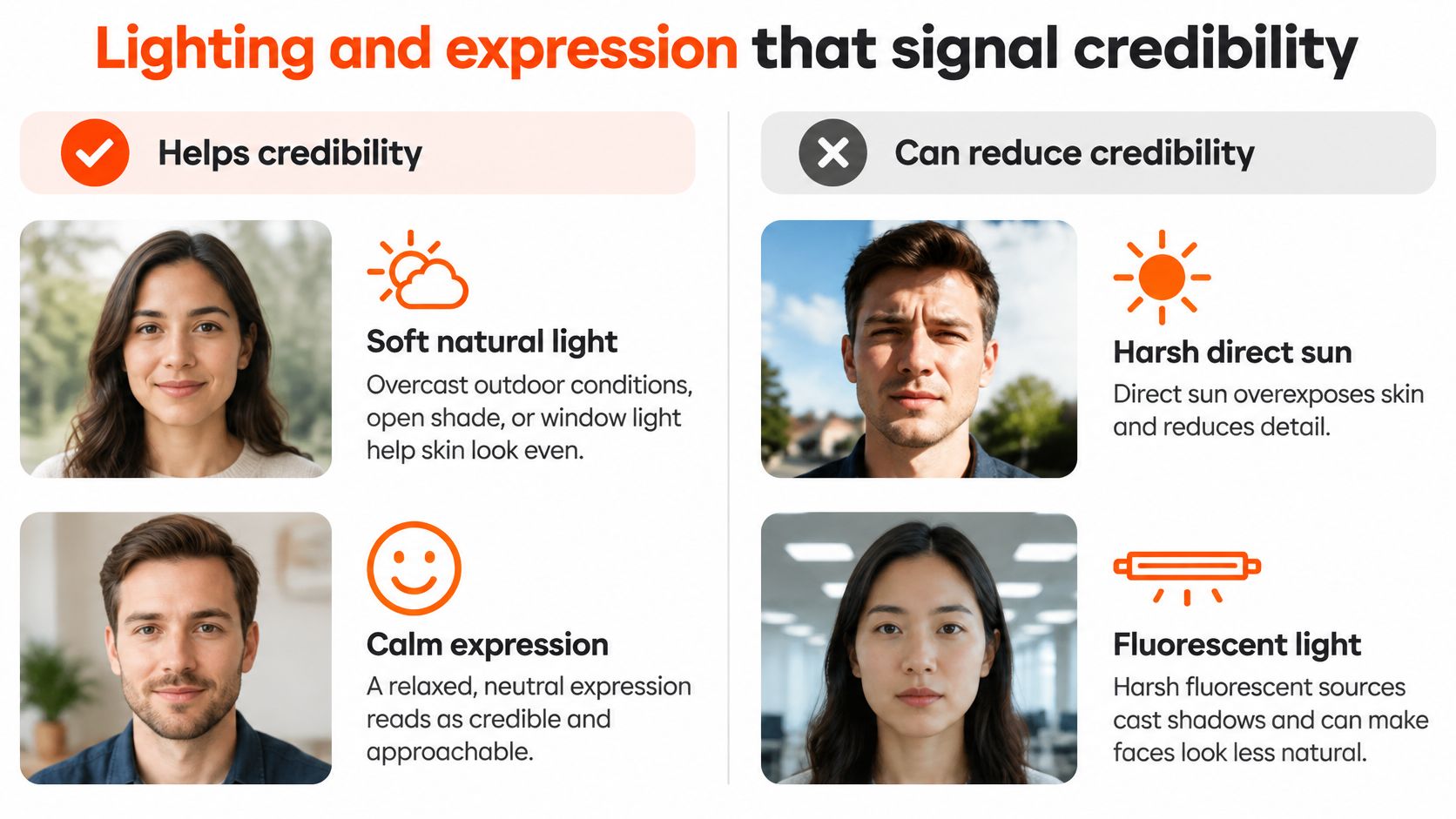
Soft light makes facial detail easier to read. LinkedIn's professional-photo guidance recommends natural illumination such as overcast conditions, open shade or window light, and warns that direct sunlight and harsh fluorescent sources produce exposure problems, shadows or unwanted color casts.
We start beside a window with indirect daylight, not with the window behind the subject. Backlighting leaves the background bright while the face becomes comparatively dark. A ceiling light alone is also a poor starting point because the brow casts shadows over the eyes.
Make the eyes visible
Place a broad light source in front of you or slightly to the side, just above eye level. Turn toward it until both eyes remain readable and the shadowed side retains detail. If the contrast feels severe, bring a white card or pale surface beside the darker side to reflect light back.
Turn off room lights that introduce a different color from the window. Mixed illumination makes skin correction harder because one side of the face looks warmer or greener than the other. Our guide to the best lighting for headshots explains how to adapt the setup to the space you have.
We treat lighting as a technical foundation, not evidence of character. A well-exposed face is easier to see; it doesn't establish trustworthiness.
Choose warmth without forcing it
The same LinkedIn guidance reports an analysis of 800 profile pictures in which smiling subjects were perceived as more likable, competent and influential, with teeth-showing smiles receiving twice the likability rating of closed-mouth smiles. Those are perception ratings, not a requirement to show teeth or evidence that smiling subjects perform better at work.
For an executive portrait, we favor a restrained, natural smile over an exaggerated expression. For a therapist or teacher, we'd choose a warmer expression over a rigid formal pose when it reflects how that person meets clients or students. A comfortable neutral expression is preferable to a visibly forced smile.
Light sets the tone; expression sets the warmth. Relax your jaw, breathe out and let your shoulders settle before the shutter fires.
Keep retouching moderate, white balance neutral and eyes sharp. Preserve skin texture and the features someone will recognize in a meeting.
For a final check, temporarily convert the portrait to greyscale. Confirm that the eyes remain visible and the jaw separates from the background. If those shapes disappear without color, adjust the light or background before polishing the file.
Mistakes that weaken a professional profile photo
A phone camera isn't the problem. An uncontrolled setup is. In Forbes' account of Jobvite findings, 41% of recruiters said seeing a candidate's picture before an initial meeting shaped their first impression, while 18% viewed selfies negatively, down from 25% the previous year, without obvious issues such as alcohol or drug use.
Those historical survey responses describe recruiter attitudes, not an objective measure of portrait quality. We don't reject a photograph because someone used a phone. We reject distracting perspective, hidden eyes and presentation that makes identity harder to establish.
Common profile photo mistakes, causes and fixes
| Mistake | Why it hurts | Fix |
|---|---|---|
| Arm-length selfie | Close camera distance distorts facial proportions and crops the shoulders | Set the phone farther away at eye level; use a helper or tripod and crop afterward |
| Harsh light (flash, overhead fluorescent or backlit window) | Hard shadows, color cast and a dark face | Shoot in open shade or turn the face toward a window |
| Heavy retouching or beauty filter | Skin and face no longer match the person in a meeting | Limit to light clean-up and keep the eyes sharp |
| Sunglasses or hat | Hides the eyes, the main visual cue for expression | Remove sunglasses and nonessential hats; retain religious or necessary headwear |
| Group photo cropped to one person | Stray limbs or a partner's shoulder remain in frame | Export a single-subject master |
| Casual or busy background | Reads as personal and pulls attention from the face | Use a neutral wall or soft gradient |
| Photo several years old | Creates a mismatch at the first meeting | Retake when your appearance changes noticeably |
Fix the capture before the edit
Moving the camera farther away solves a different problem from choosing a flattering filter. Distance changes perspective; a filter changes the recorded appearance. Use the rear camera, support the phone securely and bring the lens to eye level rather than tilting it upward from a desk.
Inspect the edges as carefully as the face. A cropped hand, bright doorway or leftover shoulder becomes surprisingly prominent in a small circle. Remove the distraction by reframing, not by applying stronger background blur to an unsuitable image.
A professional profile photo should look like you on a prepared day, not like a different person.
We also skip novelty treatments, aggressive sharpening and artificial eye brightening. These edits attract attention to the processing instead of the person.
Replace the portrait when your appearance changes noticeably. The useful test isn't the file's birthday. It's whether someone arriving for a meeting can confidently recognize you from it.
Bias, accessibility and consistency for corporate teams
A photo provides a recognition cue, but it also exposes age, race, gender, disability and perceived attractiveness to judgment. Visibility and fair evaluation aren't the same thing.
A Swiss study of LinkedIn impression management found that older job seekers received fewer job offers than younger candidates, and that a younger-looking photograph reduced, but didn't eliminate, the age-related disadvantage. We don't read that finding as an instruction to erase age. We read it as a warning about appearance-based evaluation.
Separate personal choice from employer policy
For a personal networking profile, decide whether a public portrait serves your recognition needs and comfort with exposure. For an application, follow the country, employer and program's submission rules rather than assuming a LinkedIn convention belongs on every document.
Choose a natural representation over a heavily altered appearance. For an employer-controlled directory, ask who will see the photo, where it will appear and how employees can update or replace it. These are different decisions from selecting a public-facing portrait.
Rigid demands for direct eye contact, a visible smile or a conventional pose disadvantage people whose appearance, disability, religious practice or movement doesn't fit that template. We preserve recognizable identity rather than forcing autistic professionals, people with facial differences or colleagues with mobility limitations into an uncomfortable standard.
Standardize the production, not the person
Use a shared crop, eye-line range, lighting approach and background family. Allow adjustments to camera height, posture and expression so the standard remains workable for the actual team.
Our team picture ideas offer ways to coordinate a group without making every portrait identical. Where the publishing system supports alt text, describe what the photograph shows rather than inserting praise or presumed personality.
Team standard: Match the visual treatment, preserve individual identity, and keep photographs out of screening decisions.
A directory should help colleagues and clients recognize people. Employers should assess candidates through job-relevant qualifications and structured evaluation, not facial presentation.
Choose your route and upload your first set
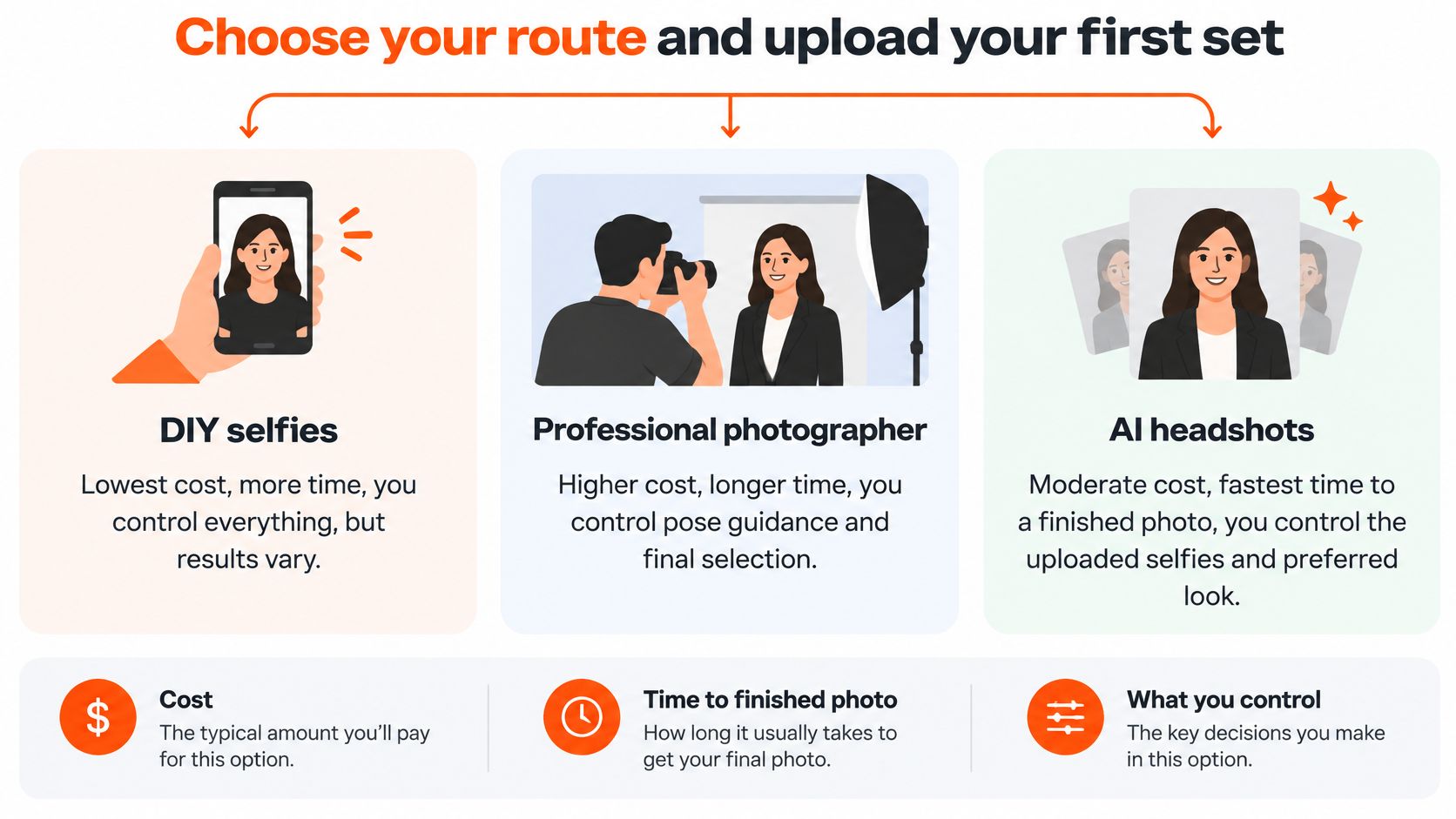
Pick the route by the control you need and the deadline you face. A photographer directs the session with you. A DIY shoot leaves capture and editing in your hands. A generated portrait starts from photos you already have, so the decision work shifts to the final selection.
Photo routes compared on time and control
| Route | Time to finished photo | What you control |
|---|---|---|
| Professional photographer | Booking, travel, the session and the agreed delivery wait | Lighting, framing and retouching, decided with the photographer |
| DIY phone shot | Your shooting, selection and editing time | Lighting, framing and file specs, all on you |
| AiHeadshots | Uploading 10 to 20 casual selfies, then the wait for the email that your pack is ready | Selfie variety, chosen styles and the final accuracy check |
A photographer's quote should spell out session coverage, retouching, usage and delivery terms, since an unexplained day rate tells you nothing about the finished package. DIY carries no service fee when you already own a suitable phone and have someone to check the frame, but we then supply the preparation and the quality control ourselves.
Know what you send and what comes back
AiHeadshots generates professional headshots from photos you upload, with realistic lighting, studio-quality retouching and multiple background styles powered by Studio Pod technology. The inputs are 10 to 20 casual phone photos. Varied angles, expressions and lighting give the model more to work with, and professional source shots are not needed. You pick your styles, and the service emails you when the pack is ready.
The Professional plan costs $39 and returns 50 finished headshots across 5 style looks, including corporate, casual and creative options, with an outfit and up to 4 backgrounds. Downloads arrive print-ready at 4096px, sized for LinkedIn, company sites and press kits.
Your uploads train a private model and generate your pack only. They are never used to improve the base model, sold, shared or exposed to third-party AI labs, and you keep full ownership of the photos you send and every headshot generated from them.
Select for accuracy, then submit
Read the finished pack the way a stranger reads your thumbnail: for recognition first, flattery second. Check facial proportions, hairline, glasses, clothing edges and skin texture before choosing. Reject any image that shifts an identifying feature, even when the portrait looks polished.
Platforms treat these images differently. LinkedIn, Zillow, Compass, hospital staff directories and most corporate websites accept photoreal AI headshots without disclosure, while medical fellowship applications and certain casting platforms require you to state that the portrait was generated. Check the receiving platform's rules before you submit.
Before uploading, compare the chosen frame with the specification and mistake tables above. The right photo for a professional profile meets the destination's requirements and stays unmistakably you.
Visit AiHeadshots and upload 10 to 20 casual selfies to receive 30 or more finished headshots, then choose the portrait that reads as you at thumbnail size.
