



A traditional corporate headshot session runs $300 to $600 or more and takes one to three weeks. An upload-based option like AiHeadshots delivers 30+ studio-grade headshots in roughly 30 minutes for $29.
The surprising part is that the camera isn't the first problem. Consistency is. A beautifully lit portrait can still weaken a company page if the next employee appears against a different background, with a tighter crop, colder color, or visibly different retouching.
People form impressions from faces almost instantly. Princeton psychologists Janine Willis and Alexander Todorov found that viewers formed impressions of attributes such as trustworthiness and competence after seeing a face for 100 milliseconds, one-tenth of a second, in research published in Psychological Science and summarized by Snappr's professional headshot analysis. Your job isn't to take a flattering photo. It's to produce a recognizable, credible visual asset that works on a team page, LinkedIn profile, conference badge, and mobile screen.
Table of Contents
- What a corporate headshot is actually for
- Setting up the shoot so the team stays consistent
- Directing subjects who have never been photographed
- Wardrobe, background, and the rules that keep a team on-brand
- Post-processing that scales to a whole team
- Choosing between a shoot day and AiHeadshots
What a corporate headshot is actually for
A corporate headshot gives an unfamiliar person a fast visual answer to a basic question: who am I about to deal with? The image should make the subject recognizable, current, and aligned with the role. It shouldn't look like a cropped wedding photo, a passport image, or a casual selfie taken in poor light.
That distinction matters most on a team page. One executive portrait can succeed on its own with a more expressive pose or location. A 30-person team page has a different requirement. If every portrait uses a different crop, background, color temperature, and camera angle, the page feels assembled rather than designed. The inconsistency becomes a brand signal.
LinkedIn's reported data shows the practical reach of a professional image. Profiles with a photograph receive as many as 21 times more profile views and up to 36 times more messages, while earlier LinkedIn-related reporting associated profile photos with approximately 9 times more connection requests. These figures, reported in LinkedIn profile photo data summarized by Snappr, don't guarantee interviews, sales, or hiring outcomes. They do show that the image is part of professional communication, not a decorative field.
Practical rule: Design the portrait for the smallest place it will appear. Eyes must remain visible, the face must read clearly, and the crop must survive a thumbnail.
You have two workable production paths. The first is a controlled in-person setup, where every subject stands or sits in the same environment and receives live direction. The second is an upload-based pipeline, where employees submit phone selfies and receive a set of generated portraits. Both can produce useful corporate assets, but they solve different constraints.
If you're still defining the distinction between a business portrait and a casual profile image, this guide to what a professional headshot is gives the right foundation. Teams also benefit from pairing consistent portraits with an AI-powered LinkedIn growth tool, so the image and the profile activity support the same professional identity.
Setting up the shoot so the team stays consistent
A camera setup should be boring. Boring means repeatable, and repeatability is what makes a team page look intentional.
Start with one fixed backdrop. Use a clean studio gray, a softly blurred office, or a controlled brand-colored background. Keep the subject several feet in front of it so the background falls slightly out of focus and doesn't compete with the face. A business portrait guide from Match Production recommends soft, directional light placed slightly above and to one side, rather than flat front light or harsh overhead office lighting.
Use a portrait-friendly focal length. Adobe recommends the 80 to 120 mm range for corporate portraits because it reduces the facial distortion associated with wide-angle lenses while preserving a comfortable working distance. For a practical team setup, an 85 to 105 mm lens is an efficient target. Put the camera at the subject's eye line. A camera positioned too low can make the face feel imposing, while a camera positioned too high changes the relationship between the eyes, jaw, and shoulders.
Build the lighting once
Use a large, diffused key light slightly above and to one side of the subject. This creates shape without producing hard shadows. Add modest fill with a second light or reflector to open the shadow side. Use a restrained rim or background light only when dark clothing blends into a dark background.
Don't use ceiling fluorescents as your primary source. They create dark eye sockets, uneven color, and forehead shine. They also vary across office locations, which makes matching employees difficult.
The repeatable baseline is:
- Backdrop: Keep the same surface, distance, and visible tone for every subject.
- Camera: Lock the height, focal length, distance, and framing.
- Lighting: Keep the key light's position and intensity fixed, with fill adjusted only when necessary.
- Color: Lock white balance and exposure instead of allowing the camera to change them between people.
Before anyone joins the session, photograph a test frame. Check skin tone, background brightness, reflections in glasses, hair highlights, shadow density, and the amount of headroom. Adobe's corporate headshot guidance specifically emphasizes consistent color balance, backgrounds, and composition.
Keep the eyes near the upper third of the frame, but leave enough space above the head for platform cropping. Capture several expressions rather than relying on one pose. The technical setup works only if the production schedule protects it. If employees arrive randomly, change the lights for each person, or move the backdrop around the room, the standard disappears.
That process is effective for a planned shoot day. It breaks down for organizations that need a full set of portraits within hours instead of weeks. In that situation, the right question isn't which camera to rent. It's whether an in-person session is still the right production method.
Directing subjects who have never been photographed
Few employees need a posing lesson. They need clear instructions that give them something specific to do.
Start with the face, not the smile. Say, “Turn your body slightly away from the camera. Bring your eyes back to me. Drop your shoulders. Relax your jaw.” Those directions remove stiffness without asking the subject to perform a personality.
A nervous executive often hears “smile” and produces a fixed expression. Use a small prompt instead: “Think of someone you enjoy working with, then look back here.” If the smile disappears, that's fine. A calm, attentive expression often reads better than a forced grin.
Give the body a simple job
Keep both feet grounded if the subject is standing. If seated, choose a stool height that lets the person sit upright without lifting the shoulders. Turn the torso slightly, place the hands out of frame or loosely together below the crop, and keep the chin level. A chin pushed forward creates tension. A chin pulled back creates a compressed neck and guarded expression.
Don't press the shutter the moment someone steps onto the mark. Give the subject time to settle, then speak continuously in short, ordinary instructions. A quiet room can make people more self-conscious, so low music and a predictable rhythm help. You don't need a long session to create comfort. You need a photographer who notices the jaw tightening, fingers curling, or shoulders rising before those details reach the final frame.
“Keep your eyes with me. Let your mouth rest. Now give me a small smile, not a big one.”
Check the eyes at full resolution and at thumbnail size. Eye contact should feel direct without looking frozen. Take a short sequence while the subject moves between a neutral expression, a slight smile, and a warmer expression. Then choose the frame where the eyes, mouth, and shoulders agree.
A corporate portrait separates from an ID photo here. The background and lighting establish technical consistency. Direction gives the employee a usable presence.
Wardrobe, background, and the rules that keep a team on-brand
Most team-page drift comes from wardrobe and background variation, not from a minor camera-setting error. Give employees a one-page guide before the session, with examples that match the company's actual dress standard.
Solid colors and simple necklines keep attention on the face. Busy patterns can create distracting detail or moiré on screens. A jacket, knit top, blouse, or shirt can all work if the shape and contrast suit the role. Don't force every employee into identical clothing. The visual system should be consistent, not culturally narrow or artificially uniform.
Glasses deserve a practical check. Adjust the key light to reduce reflections, ask the subject to tilt their chin slightly if necessary, and don't remove frames that are part of the person's normal appearance. Religious garments, natural hair texture, visible disabilities, birthmarks, and other personal features shouldn't be treated as defects to erase. Retouching should remove temporary distractions, not impose one appearance standard.
Choose a neutral paper backdrop when the company needs maximum consistency across locations. Choose a softly blurred office background when the environment communicates useful context and the team can control the visible area. A branded color works only when it remains readable against every subject's clothing and skin tone.
| Decision | Rule for team consistency |
|---|---|
| Backdrop color | Choose one gray, office, or brand treatment and keep its tone stable. |
| Lighting direction | Place the diffused key slightly above and to one side for every employee. |
| Framing rules | Keep the same camera height, headroom, shoulder position, and crop. |
Test the backdrop and light across the whole team, not only on the first person. Different skin tones, hair textures, clothing colors, and mobility needs reveal problems that a single test subject won't. Inclusive consistency means equal technical quality, not identical poses.
Give employees advance notice about flashes, crowded spaces, and the session format. Provide a wheelchair-accessible setup and clear alternatives for people with sensory or mobility needs. For a more detailed internal policy, use this corporate photo shoot dress code guide as a starting point, then adapt it to the company's real culture.
Post-processing that scales to a whole team
Editing one portrait is easy. Editing a large batch without visual drift requires a locked sequence.
Start with a baseline preset in Lightroom, Capture One, or Photoshop. Apply the same starting contrast, color profile, sharpening, and background treatment to the whole batch. Then make individual exposure adjustments for the subject, because identical slider values don't produce identical-looking skin tones.
Batch first, individual second
Match white balance before retouching. If one portrait is warm and the next is cool, the team page will look fragmented even when both images are technically sharp. Clean the background to the same tone used in the approved test frame. Remove temporary distractions such as lint, a stray blemish, or a small reflection. Keep natural skin texture and defining features intact.
Sharpen the eyes selectively. Global sharpening emphasizes hair, clothing, and background noise, while modest eye sharpening directs attention where it belongs. Check the images together in a contact sheet, not only one at a time. The contact sheet reveals changes in crop, background brightness, face size, and color that are easy to miss in an individual gallery.
Export at least two practical versions from one master file. Use a web-ready file for the company site and a square or platform-ready crop for LinkedIn. Name files consistently so HR or marketing doesn't need to guess which version belongs to which employee.
Privacy belongs in the editing workflow too. If a company processes facial imagery through a vendor, it needs a stated purpose, controlled access, retention rules, and a deletion process that covers devices, cloud storage, and backups. Canada's Office of the Privacy Commissioner says biometric information should be used only for the purpose for which it was collected, retained only as long as necessary, and permanently destroyed from every location when no longer needed, as detailed in its organizational biometric privacy guidance.
The governance line is simple. Improve a temporary distraction. Don't erase the person.
Choosing between a shoot day and AiHeadshots
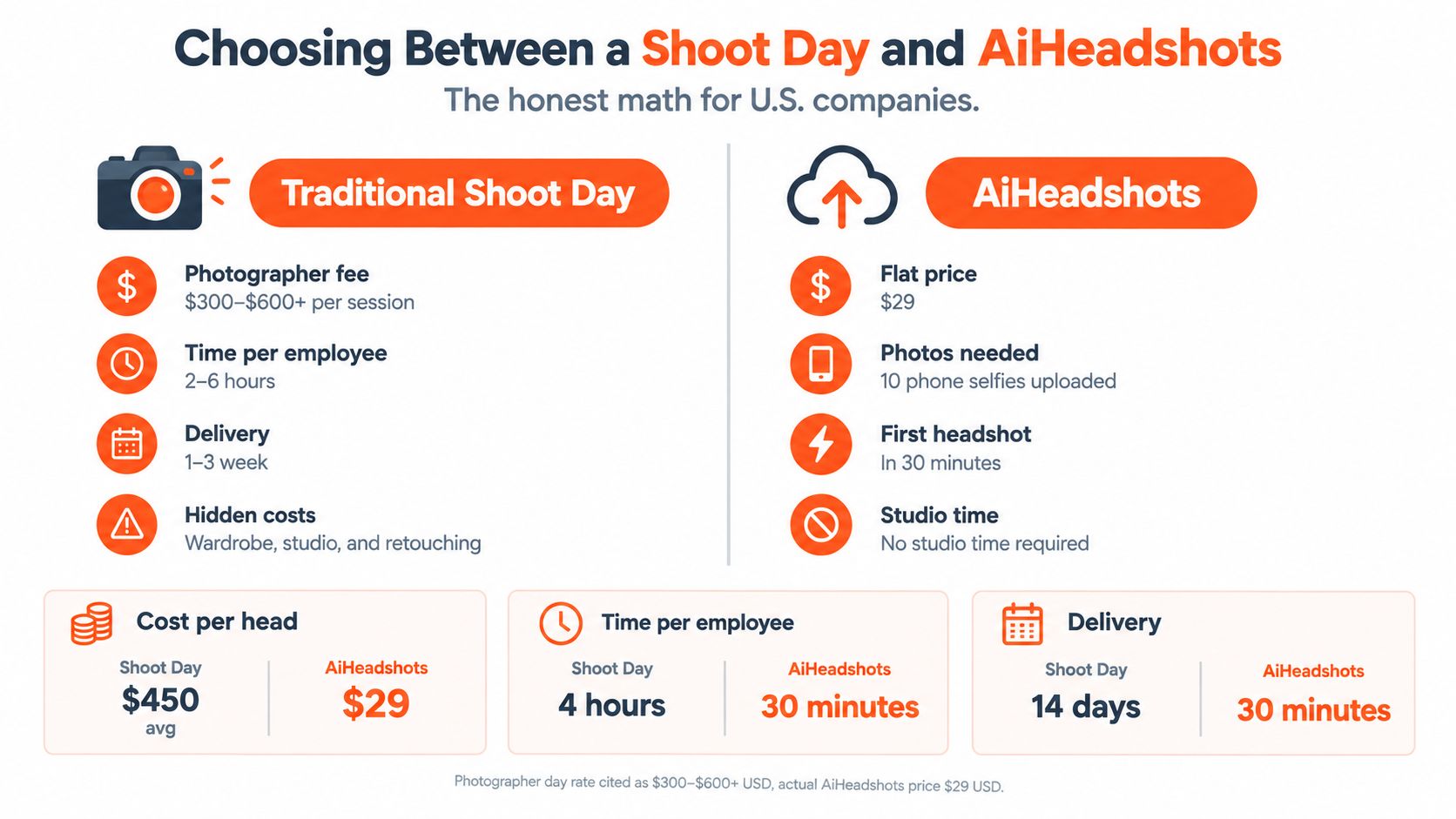
A studio day is not automatically the best way to make a team page look consistent. It remains the right choice when an executive needs portraits tied to a specific workplace, a creative director needs live control, or employees lack usable source photos. For a distributed team that needs matching profile images quickly, an upload workflow can remove the largest bottleneck: getting everyone into the same room.
For a 30-person team, a shoot day requires 30 scheduling slots, a location, preparation, wardrobe coordination, and follow-up on missed appointments before the first frame is taken. The final workload also includes selection, retouching, approvals, and delivery. A comparison chart showing the costs, time, and efficiency differences between traditional professional headshot photography and AI headshot services. makes the trade-off easier to assess.
AiHeadshots uses a different input path. Customers upload 10 to 20 phone selfies, choose a professional direction, and receive 30+ studio-grade headshots in roughly 30 minutes. Plans include Basic at $29, Professional at $39, Executive at $59, and Teams pricing at $22 to $29 per seat for 10 or more seats. AiHeadshots comes from Studio Pod, an automated headshot studio in Houston founded by photographers Joseph West and Chris Bailey. The team has photographed 10,000+ real professionals since 2019 and developed the product from that photography background.
That experience matters because a usable corporate portrait depends on more than a polished face. Lighting, expression, framing, clothing, and background still need to work together. Published customer figures include 30,000+ customers served, 255,000+ headshots delivered, and a 4.9-star rating, alongside a 100% money-back guarantee within 14 days. Check the AiHeadshots pricing page for current plan terms.
Decision rule: Choose a shoot day when live direction and a controlled physical environment matter most. Choose an upload workflow when speed, distributed participation, and consistent delivery matter more than photographing everyone in one room.
A coordinator should settle the governance questions before collecting images. Is participation voluntary? Where will the portraits appear? Can the company reuse them in recruiting or advertising? How long will inputs and outputs remain available? What happens when an employee withdraws consent or leaves?
AiHeadshots states 7-day input retention, 30-day output retention, and 90-day billing retention. Employees who decline need a meaningful alternative, such as an approved existing photograph, a monogram, or another portrait process. For a closer examination of the trade-offs, read this comparison of whether AI headshots are worth it. Teams building a visual system can also review methods for creating consistent profile photo batches across employee profiles, social platforms, and company pages.
Use a photographer when the portrait itself requires direction. Use an upload-based workflow when the priority is a coherent set of profiles by the end of the week. The cheaper path is the one that removes the constraint your team has.
AiHeadshots gives professionals and teams 30+ studio-grade headshots from 10 to 20 phone selfies, with delivery in roughly 30 minutes and plans starting at $29. Upload your selfies, choose a corporate style, and visit AiHeadshots to create a consistent portrait set without booking a studio day.
