



The most popular advice about taking a professional headshot on iPhone is incomplete. People focus on Portrait mode, blurred backgrounds, and expensive-looking lighting. Those details matter, but your image will be judged first as a small LinkedIn thumbnail, not as a full-screen gallery print. A technically polished portrait fails if your eyes disappear, your crop is too loose, or your expression looks artificial at profile size.
A good iPhone headshot needs three things: controlled light, deliberate composition, and a face that still reads clearly when reduced. Apple supports Portrait mode on iPhone SE, 2nd generation and later, iPhone X and later, iPhone 7 Plus, and iPhone 8 Plus (Apple's Portrait mode guidance). You don't need extra camera gear to create a credible professional portrait, but you do need to shoot it like a portrait photographer rather than like a person taking a selfie.
Table of Contents
- The iPhone already beats the studio on cost and speed
- Setting up window light and camera settings
- Pose, expression, and the thumbnail test
- iPhone shoot vs photographer vs AI headshots
- Keeping a team consistent without looking fake
- When DIY plateaus and what comes next
The iPhone already beats the studio on cost and speed
A studio portrait is not automatically the better LinkedIn asset. At thumbnail size, framing, facial clarity, and expression matter more than camera prestige. An iPhone can produce a credible headshot quickly, provided the face remains readable and the crop works at the size people see in a feed or search result.
The cost advantage is straightforward. A photographer's session can run $300 to $600 or more per day, while the cited Dallas multi-camera studio example charges $400 or more per subject. Those figures make a phone you already own attractive for repeat portraits. The trade-off is labor. You handle the room, direct the subject, check the framing, and accept a lower ceiling for complex lighting and retouching.
For example, a ten-person team booking a $400-per-person session spends $4,000 for one round of portraits, or $8,000 across two comparable renewals. An existing iPhone, tripod, window, and repeatable background cost far less. The savings only hold if someone owns the process and keeps the images consistent.
iPhone vs photographer vs AI
| Method | Cost per headshot | 10-person team cost | Turnaround |
|---|---|---|---|
| iPhone session | $0 in existing gear | $0 in existing gear | Same session |
| Photographer | $400+ per subject in the cited studio example | $4,000+ | Scheduled session and delivery |
| AI service | $20 to $30 in the cited comparison | $200 to $300 | Fast digital delivery |
The iPhone suits a practical headshot you need now, especially when one person can control the room and direct each subject. It struggles when employees use different walls, light sources, distances, and crops. The camera is rarely the weak point. Repeatability is.
That consistency also affects how a team appears in LinkedIn search results. Matching head size, eye position, background tone, and crop creates a recognizable group without forcing everyone into an identical expression. A technically attractive image still underperforms if the face becomes too small or the expression looks artificial at thumbnail size.
LinkedIn profile photos also carry more weight than many people give them. Widely cited 2025 and 2026 summaries report that profiles with professional photos can receive 21 times more views, up to 36 times more messages, and 9 times more connection requests than profiles without photos. Another recruitment-focused report says 86% of recruiters and hiring managers spend 30 seconds or less on initial profile screening (LinkedIn profile photo guidance from Magic Studio). These figures do not guarantee an outcome, but they support spending attention on a clear face and credible expression, not only on background blur.
Setting up window light and camera settings
Start with the light, not the camera app. Place yourself 2 to 3 feet from a north-facing window, or use an east-facing window when that gives you softer light. A white foam-core board or reflector on the shadow side brings detail back into the cheek and eye without introducing a second color temperature. Diffuse direct sunlight with sheer curtains or a thin white sheet (window-light portrait guidance).
Turn off ceiling lights. Don't stand with your back to the window and ask the phone to rescue your face. Overhead fixtures carve shadows under the eyes and nose, while mixed daylight and artificial light produce uneven skin color. Keep a clean wall 4 to 6 feet behind you so Portrait mode has space to separate the subject from the background.
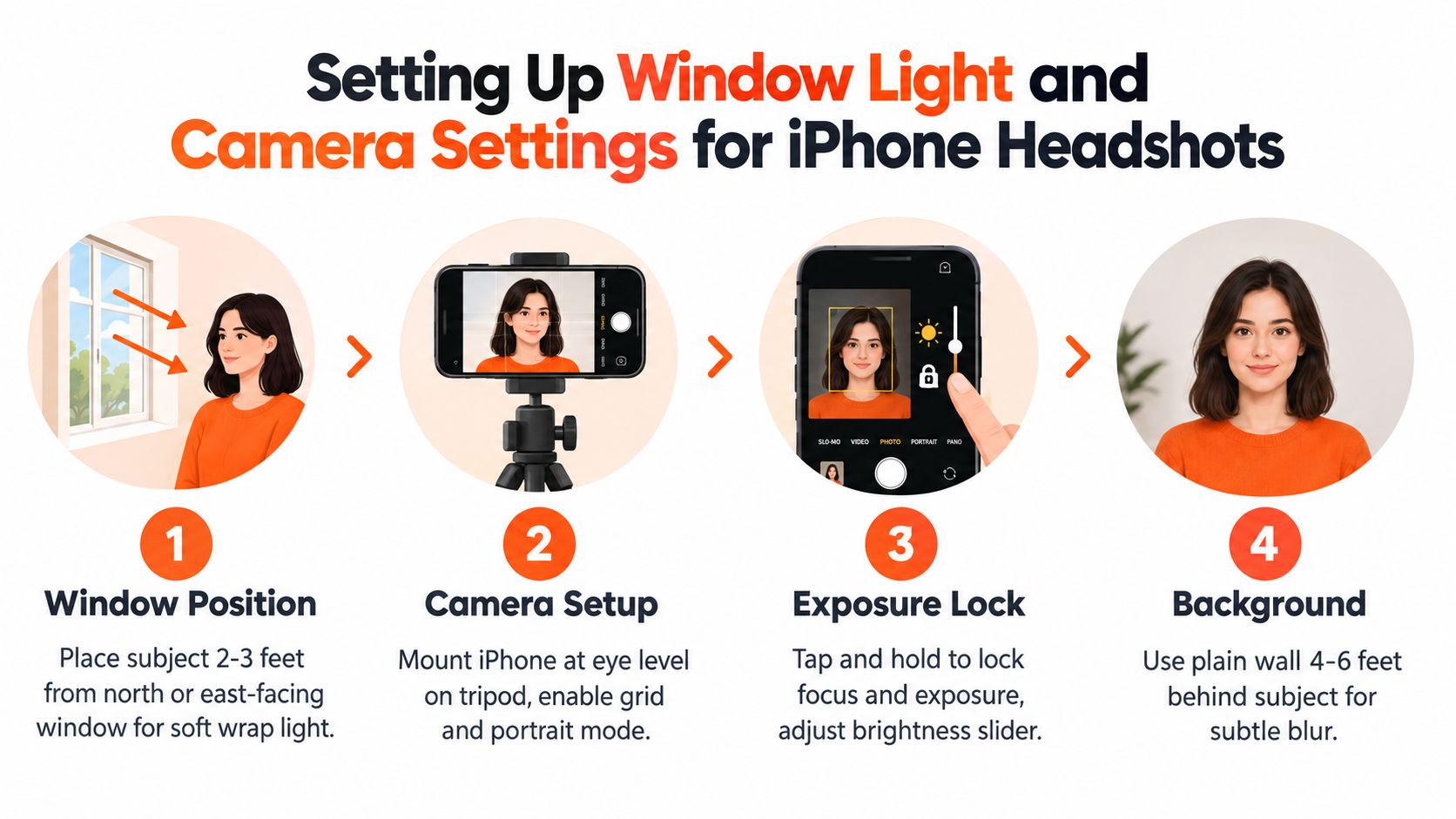
Mount the iPhone on a small tripod at eye level. Use the rear camera, Portrait mode, and the Natural Light effect. Choose the 1x or 2x optical lens available on your phone. Avoid 0.5x ultra-wide and digital zoom, both of which make facial proportions look less natural. Apple documents a portrait distance of roughly 2 to 8 feet, with prompts such as “Place subject within 8 feet” when the framing isn't working (iMore's explanation of Portrait mode distance).
Keep the phone 4 to 6 feet from the subject and frame slightly loose. That leaves room for a professional crop later. Tap and hold on the brightest facial highlight to activate AE/AF Lock, then lower the exposure until the skin remains textured rather than white. Portrait mode can also apply Portrait Lighting effects on supported iPhones, including iPhone X and later and iPhone 8 Plus, with an intensity slider documented by Apple's camera support instructions.
Practical rule: The brightest part of the face should retain detail. If the forehead or cheek has become a flat white patch, the exposure is too high.
Shoot at least ten frames, then inspect the eyes at full size. Look for a sharp nearer eye and a small catchlight in both eyes. If your skin needs a final pre-shoot cleanup before close framing, a targeted option such as Pic Mobile Rapid skincare solution can be considered, but don't replace good light with aggressive retouching.
For a more detailed lighting reference, use this guide to the best lighting for headshots.
Pose, expression, and the thumbnail test
A polished portrait can fail on LinkedIn before anyone opens the profile. Test the image at thumbnail size, where facial structure and team consistency matter more than fine skin detail. Current guidance places the mobile profile image around 150 by 150 pixels. I also check a copy at 96 by 96 pixels because weak expressions, busy backgrounds, and loose crops become obvious there (thumbnail-focused LinkedIn headshot guidance).
Turn your shoulders roughly 15 to 25 degrees away from the camera. Send the far shoulder slightly back, then lean forward a fraction from the waist. This gives the jawline a cleaner shape and adds presence without creating a staged power pose. Keep your chin just below level, look into the lens, and avoid watching your own face on the screen.
Expression needs control. A closed-lip smile with engaged eyes usually holds together better after reduction than a wide grin. At tiny size, an open-mouth smile can lose its structure and read as a bright shape, while attentive eyes still look human and capable. Take several frames while speaking naturally, then choose the one that looks alert without appearing frozen. For additional positioning examples, use this guide to how to pose for headshots.
Build the crop for recognition
Keep the head in the upper 60% of the frame, slightly off center. Leave negative space on the side toward which the face turns, especially when the portrait appears beside a headline or introductory copy. Frame from the chest or shoulders upward, and avoid cutting through the chin, neck, or widest point of the shoulders.
The crop should support recognition first. Export a test copy at 96 pixels square on your phone and ask one question: do the eyes attract attention immediately? If the background competes, tighten the crop or simplify the visible surroundings. If the face feels cramped, restore a little room above the forehead and around the shoulders.
A slightly warm, natural expression suits the “real, but polished” look often used for creative, technology, and marketing profiles. It should still resemble the person colleagues meet in real life. For teams, repeat the same framing, head size, and background treatment across every employee. Consistency makes a company page feel intentional, while identical expressions can make it look artificial.
iPhone shoot vs photographer vs AI headshots
The right choice depends on the job the image must perform, especially at LinkedIn thumbnail size. An iPhone portrait is fast and inexpensive, but the subject must control the light, expression, focus, and crop. That trade-off works for one profile refresh when the setting is controlled and the final image still reads clearly at a small scale.
A photographer adds direction and repeatability. From behind the camera, they can correct a raised shoulder, tense mouth, uneven gaze, or changing light before those problems reach the final file. Traditional sessions often run $150 to $400 per person with a 1 to 2 week turnaround, according to the comparison used here. The fee pays for judgment, controlled backgrounds, posing guidance, and retouching, not merely access to a better camera.
AI headshots reduce the scheduling burden. Services such as Aragon and HeadshotPro use uploaded personal images to generate finished portraits. Cited comparisons place AI services at $29 to $69 per seat, with fast digital delivery. That speed helps when several people need updated profiles, but generated images have a different quality ceiling. Inspect glasses glare, jewelry, hands, hair, and facial symmetry before using the result publicly.
| Option | Cost per person | Turnaround | Best for | Quality ceiling |
|---|---|---|---|---|
| iPhone shoot | Existing gear cost | Same session | One-off LinkedIn and directory updates | Strong with controlled light |
| Photographer | $150 to $400 | 1 to 2 weeks | Executives, teams, and brand campaigns | Executive-grade polish |
| AI generation | $29 to $69 | Fast digital delivery | Multiple styles and quick refreshes | Polished, with synthetic artifacts to inspect |
The practical decision comes down to finish, deadline, and headcount. One founder with a good window can produce a credible image. A leadership team launching a website needs matching head size, crop, color, and expression range, because inconsistent thumbnails make the group look assembled rather than intentional.
Use this guide to getting professional headshots when comparing the workflows and deciding where hands-on direction matters most.
Keeping a team consistent without looking fake
Consistency is where most DIY team headshot projects break. Ten attractive portraits can still look unprofessional together if one person stands in a kitchen, another uses a white office wall, and a third shoots under blue ceiling lights.
Choose one location and make the inputs repeatable. Use the same window orientation, similar time of day, subject distance, camera height, background color, and shoulder angle. A clean white or warm gray wall usually gives a roster a coherent visual base without overpowering the face.
Standardize the capture
Lock the phone at the same eye-line height for every person. Mark the floor where the tripod stands and mark the subject position if the team will shoot across multiple sessions. Keep the crop consistent, with comparable head size and shoulder visibility. A team page looks intentional when the eyes line up across the row.
Use one edit across the set in Lightroom Mobile or VSCO. Match skin color, contrast, brightness, and white balance before adjusting individual images. Don't force every face into identical brightness. People have different skin tones and hair colors, so consistency means matching the visual treatment, not flattening everyone into the same exposure.
Real consistency comes from repeatable inputs, not aggressive retouching.
The retouching ceiling matters. Keep pores visible. Remove temporary distractions carefully, but don't smooth skin until it looks painted. Avoid enlarging eyes, whitening teeth beyond realism, or changing facial structure. AI-processed and AI-generated professional images have become more common, with one cited 2026 dataset estimate reporting a 38% increase from 2023 to 2025 and approximately 9% of job candidates using AI for headshots (LinkedIn image trend reporting from Stock Photo Secrets). That shift makes credibility more important, not less.
For regulated professions, executives, and client-facing teams, agree on the acceptable editing level before anyone shoots. A consistent background and crop support trust. An obviously altered face undermines it. If the team needs a managed workflow, AiHeadshots accepts 10 to 20 phone selfies and delivers 30 or more studio-grade headshots in about 30 minutes, which gives teams a faster way to standardize output from ordinary phone photos. Review the available team options before setting a company-wide standard.
When DIY plateaus and what comes next
The iPhone workflow has a clear ceiling. You'll feel it when a board portrait needs to print at 8 by 10 inches, an investor deck needs a controlled gradient background, or a rebrand requires every executive image to match under one lighting design. A phone can produce a strong digital headshot, but large-format use exposes focus, compression, background, and retouching limitations quickly.
DIY remains a sensible choice for sales teams, course creators, conference speakers, and professionals who need credible digital portraits without a production day. It also works when the same person controls the setup from start to finish. The handoff begins when the image needs to serve several formats at once, including print, web, press, recruiting materials, and executive bios.
Signals that it's time to hand off
Printed materials are the obvious signal. Investor decks and board documents are another. A major website launch, a company-wide rebrand, or a leadership page with strict visual standards also deserves a controlled session rather than a collection of improvised phone portraits.
Studio Pod began in 2016 building turnkey photo studios, and its founders Joseph West and Chris Bailey later built AiHeadshots from that photographer background. Studio Pod has shot 10,000 or more real professionals since 2019, and AiHeadshots has served 30,000 or more customers and delivered 255,000 or more headshots, according to its company information. That history matters because the quality target comes from photographers designing an AI product, not a software team retrofitting open models.
If you want to push the phone workflow further before making that handoff, learn how to edit ProRAW photos. ProRAW gives you more control over exposure and color, but it doesn't solve a poor expression, distracting background, or inconsistent team setup.
AiHeadshots offers Basic at $29, Professional at $39, Executive at $59, and Teams pricing from $22 to $29 per seat with volume discounts at 10 or more seats. Customers upload phone selfies without a studio visit, receive 30 or more finished headshots in about 30 minutes, and get a 100% money-back guarantee within 14 days. Input files are retained for 7 days, outputs for 30 days, and billing records for 90 days.
Upload 10 to 20 phone selfies, see 30 or more photographer-built headshots in about 30 minutes, and choose the $29 Basic option at AiHeadshots.
