



Background color alone does not determine how competent you look. A review of PhotoFeeler analysis from 2014 found no statistically significant effect from background color on competence, likability, or influence ratings. Contrast and cleanliness matter more. Mid-gray, soft white, deep navy, a blurred office, warm taupe, a gradient, and brand color each create a different impression around your face.
Built by photographers with years of hands-on studio experience, AiHeadshots helps you match the background to your role and wardrobe. For more context on profile presentation, see these fotos de perfil profesional para LinkedIn.
Table of Contents
- 1. Solid mid-gray seamless backdrop
- 2. Soft white high-key background
- 3. Deep navy solid background
- 4. Blurred office environment
- 5. Warm beige and taupe backdrop
- 6. Soft gradient backdrop
- 7. Brand-color backdrop
- Seven business headshot backgrounds compared
- Pick one and match it to your wardrobe
1. Solid mid-gray seamless backdrop
Mid-gray gives a business portrait a clean, neutral frame. Its even tone keeps attention on your face and works with light or dark clothing. Photographers use a smooth paper backdrop to avoid visible texture and joins.
Choose mid-gray when you want a neutral background that works with varied wardrobe colors.
Irving Penn used plain studio backdrops to keep portraits focused on the subject. Today, mid-gray remains a practical choice for individual portraits and consistent team images. With AiHeadshots, upload photos and choose a matching backdrop and outfit. Each combination produces 10 headshots, without booking a studio session.
2. Soft white high-key background
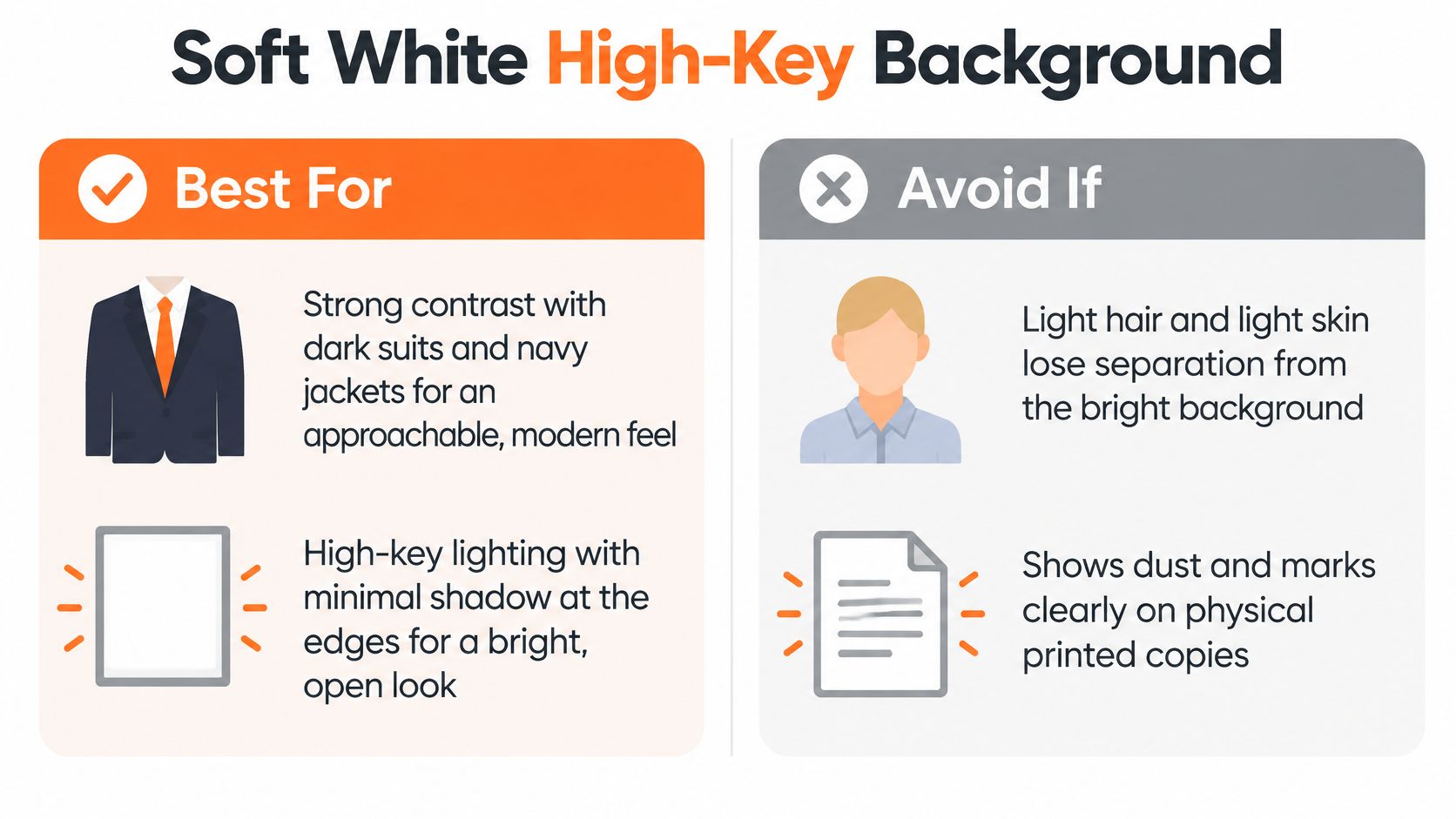
Soft white reads clean, open, and current. We light the backdrop close to white, keep the edges bright, and remove shadow behind your shoulders. It suits professional services firms that want staff directories to look uniform without looking heavy. You're the darkest, sharpest element in the frame.
Don't wear a white shirt and pale jacket against it. Pair this backdrop with a charcoal or navy jacket so your shoulders separate cleanly at thumbnail size. Ask for a slightly warm white. Pure, blue-leaning white looks sterile on skin, especially under office lighting.
The comparison below shows where high-key helps and where it costs you definition.
3. Deep navy solid background
Navy signals authority. Law firm partner pages, finance teams, and executive bios use navy or charcoal because a lit face carries strong contrast against a dark field. It stays formal in a LinkedIn circle, a speaker page, and print. For a closer look at blue tones, read our guide to a blue background for a photo.
The rule is tonal separation. Photography Shark's guidance on headshot backgrounds warns that a navy suit against a navy background can erase shoulder separation. Wear charcoal, light gray, or a pale shirt under a darker jacket with a visible edge. We add a subtle gradient so navy doesn't look like a flat cutout pasted behind you.

4. Blurred office environment
A blurred office gives context without a second subject. Windows, lamps, and shelving become soft shapes and muted color. Text, logos, people, and clutter come out. Consultants, realtors, and operations leads use this business headshot background to show a real workplace while keeping the face dominant. Our breakdown of the best headshot background covers how we judge that balance.
Annie Leibovitz built a large body of environmental portraits by placing subjects in their own spaces. Business use needs more restraint. Shoot wide open to soften detail, keep bright edges away from your head, and test the crop small.
The video below shows how background blur changes separation behind the subject.
Princeton research cited by Yesware's LinkedIn photo guide found facial impressions can form in approximately 100 milliseconds. A busy office loses that first instant.
5. Warm beige and taupe backdrop
Warm beige and taupe sit softer than gray and warmer than white. Therapists, healthcare providers, and realtors choose them when approachability matters more than boardroom formality. Therapy and wellness practices use warm neutrals across practitioner pages because the tone supports a calm expression instead of hardening it.
Pick one warm shade and hold it across the whole team. Mixed beige, sand, and gray on one page looks accidental. Wear cooler tones such as navy or deep green for contrast. Skin, hair, and shoulders need a clear edge against the backdrop.
Wardrobe check: If your top matches the taupe value, change the top. Contrast beats coordination.

6. Soft gradient backdrop
A gradient moves from a lighter center to a darker edge, or from one tone into a second. It adds depth without adding objects, text, or a location you have to explain. When the edges darken, photographers call it a vignette. Your face sits in the brightest area, so the eye lands there first.
Executive and speaker pages use subtle vignettes to separate a portrait from a white web page. Keep the transition to two or three tones. A hard falloff looks theatrical, and a steep gradient bands into visible stripes on phone screens. Check the final file on your phone at full brightness and at LinkedIn size.
Adobe's guidance on headshot backgrounds calls distraction control the most important background consideration and notes lighting changes apparent brightness, tone, and saturation. Build the gradient in the light, not as an afterthought.
7. Brand-color backdrop
A brand-color background can make a company team page feel unified, provided the color supports the face rather than competing with it. Start with the brand guide's exact color, then check how it reads against different skin tones, hair colors, and common workwear. The guide to choosing the best colors for headshots can help you assess the wardrobe match.
Color accuracy matters most when portraits sit side by side. Keep the background tone and crop consistent across the set, and check the images on both dark and light screens before approval. Research published in Cognitive Research: Principles and Implications across two internet-based studies totaling 610 participants found that people select profile images that fit the social context of networking platforms.
Seven business headshot backgrounds compared
| Background style | Best for | Formality level | Main risk |
|---|---|---|---|
| Solid mid-gray seamless backdrop | Versatile business headshots and consistent team photos | Professional, broadly suitable | Can look generic or flat |
| Soft white high-key background | Dark suits and bright, approachable portraits | Modern and professional | Light hair and skin may blend into the background |
| Deep navy solid background | Executive, finance, and law portraits | Highly formal | Dark hair or clothing may blend into the background |
| Blurred office environment | Consultants, realtors, and other workplace-focused professionals | Business casual to professional | Clutter can look dated; difficult to match across a team |
| Warm beige and taupe backdrop | Healthcare, therapy, wellness, and real estate professionals | Approachable, less formal | Beige or cream clothing may wash out |
| Soft gradient backdrop | Executive and speaker portraits needing subtle depth | Professional | Strong gradients can look templated or show banding |
| Brand-color backdrop | Unified company team pages | Depends on the brand | Bright colors can distract or limit personal reuse |
Pick one and match it to your wardrobe
Match the background to your role, then check how it separates your face and shoulders from your clothing. Navy and gray suit law and finance. Warm neutrals fit care professions. A blurred office works for consultants and realtors, while brand color helps unify team pages. White gives dark clothing a clean outline; navy needs a lighter outfit, and taupe pairs well with cooler tones.
The background should support your expression, not compete with it. Choose a setting that fits your sector and seniority, then remove visual details that add noise. Research summarized by Harvard Business School found employers use profile photos in hiring decisions, even though appearance is not strongly related to freelancers' knowledge or performance. Harvard Business School's summary of the research
AiHeadshots generates professional headshots from uploaded photos. Choose a backdrop and a matching outfit to receive 10 headshots for that combination. The Professional plan costs $39 and includes 50 finished headshots, with up to 4 backgrounds.
Upload your photos at AiHeadshots and choose the background and outfit that fit your role.