




Grey isn't the default because photographers ran out of ideas. It persists because it gives you the most control with the least visual baggage. A neutral grey backdrop can read as light, medium, charcoal, or nearly black through lighting alone, while staying free of the warm or cool cast that makes skin and clothing harder to reproduce. That makes the decision narrower and more useful: which grey fits your role, wardrobe, skin tone, and platform crop?
For LinkedIn, executive biographies, company directories, and team pages, the background has to survive more than the original file. It appears inside a circular profile crop, on mobile screens, in small directory tiles, and beside other employee portraits. A flat, carefully controlled grey usually holds together better than a busy office or a strongly colored wall. The right shade supports your face. The wrong shade makes your hair, jacket, or glasses disappear.
Table of Contents
- Why Grey Still Wins for Professional Headshots
- How to Choose the Right Grey Tone for Your Role
- Lighting Grey So It Stays Neutral and Consistent
- Wardrobe Hair and Contrast That Keep You Separated
- Retouching and AI Edits That Preserve True Grey
- Grey Headshot Looks by Profession and Final Checklist
Why Grey Still Wins for Professional Headshots
Grey earns its place through control, not habit. It stays visually quiet while offering more usable range than white or black. A true neutral grey uses equal RGB values in sRGB, such as #808080, so it adds no warm or cool cast to skin. Photography systems also use 18% reflectance as the middle-grey exposure benchmark, giving studios a reliable reference for metering and color control (Flow Headshots explains the middle-grey standard).
That neutrality matters in a LinkedIn profile circle, company directory, or team grid. White can merge with a light interface or pale clothing. Black creates strong contrast, but it can feel severe and reveal uneven lighting. Grey separates the face without forcing the portrait into a narrow visual category. Professional portrait guidance recommends grey for broad reuse across corporate headshots, executive portraits, and general business profiles (this professional portrait guide recommends grey for broad reuse).
Practical rule: Choose grey when one portrait must work across several professional contexts without looking designed for only one.
A neutral grey also gives the studio one consistent foundation for different roles and platforms (Metroplex Headshots details grey's tonal control).
The choice still depends on the person in front of it. Medium grey can look polished with a navy suit and dark hair, then flatten someone wearing charcoal. Charcoal can support an executive brief, then swallow a black jacket. Light grey may keep a small mobile crop open and readable, while a darker tone can give a larger editorial portrait more weight. Hair color, glasses, collar shape, and the intended crop all change the result.
Grey works when tone, light, wardrobe, and crop are chosen together. That makes it a deliberate system for consistent headshots, not a generic studio default.
How to Choose the Right Grey Tone for Your Role
Choose grey by intent, not habit. Light grey keeps a portrait open and approachable. Medium grey gives balanced contrast for broad professional use. Charcoal adds authority. A subtle gradient brings depth without turning the background into a design element. Professional backdrop guidance also presents charcoal and restrained gradients as current options for senior profiles (Kate Backdrop compares grey choices by professional use).
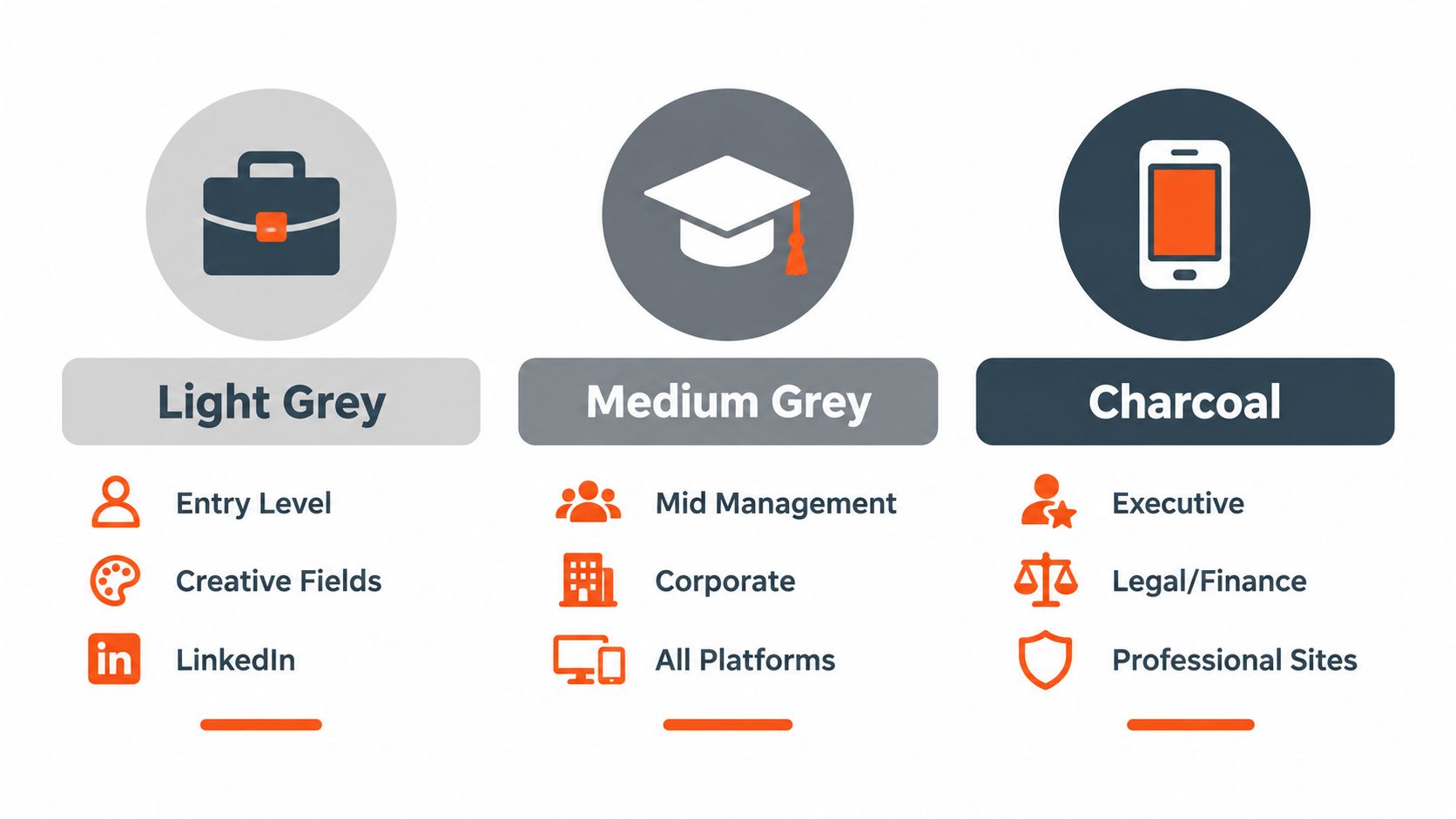
Use light grey for a broad LinkedIn presence, early-career portraits, creative roles, and team grids that need a clean, accessible feel. Medium grey suits corporate teams and general business profiles. Its middle value preserves separation across varied skin tones without making the portrait theatrical. Charcoal supports executives, attorneys, finance leaders, and senior consultants, especially with a light shirt, lighter hair, or a controlled rim light.
A dark jacket and dark hair can disappear into charcoal. Light grey can lose definition beside pale clothing or very light hair. A gradient fits executive biographies and polished team pages when a flat field feels too generic. Keep its transition quiet. If viewers notice the blend before the face, reduce it.
| Grey Shade | Best Role or Platform Fit | Concrete Setup Cue | Watch Out For |
|---|---|---|---|
| Light grey | LinkedIn, entry-level profiles, creative and approachable roles | Keep the face clearly darker than the field | Pale clothing or very light hair reducing separation |
| Medium grey, around #6E7177 | Corporate teams, mid-management, general professional use | Match the background value to the intended crop | A neutral result that needs stronger expression and styling |
| Charcoal | Executives, legal, finance, formal professional sites | Add edge separation with a light shirt or rim light | Dark hair and dark wardrobe blending into the field |
| Subtle gradient | Executive biographies, modern team pages, brand-conscious profiles | Keep the tonal change gradual behind the head and shoulders | Visible transitions distracting at larger sizes |
Medium grey remains a useful all-purpose choice because it separates the subject without imposing a dramatic mood (PetaPixel discusses medium grey and subject separation). The final decision should follow the role, skin tone, wardrobe, hair, and platform crop together.
Keep the outline readable. Choose a background roughly 2–3 shades away from the hair where possible. Eyewear also changes the edge contrast. For styling references, Style Site Optical grey frames shows how grey frame tones can remain visible without taking attention from the face.
Lighting Grey So It Stays Neutral and Consistent
Grey stays neutral when the background is metered separately from the face. Set the key light for the skin and expression first. Then measure the backdrop on its own. The background is a second exposure, not an automatic result of the first.
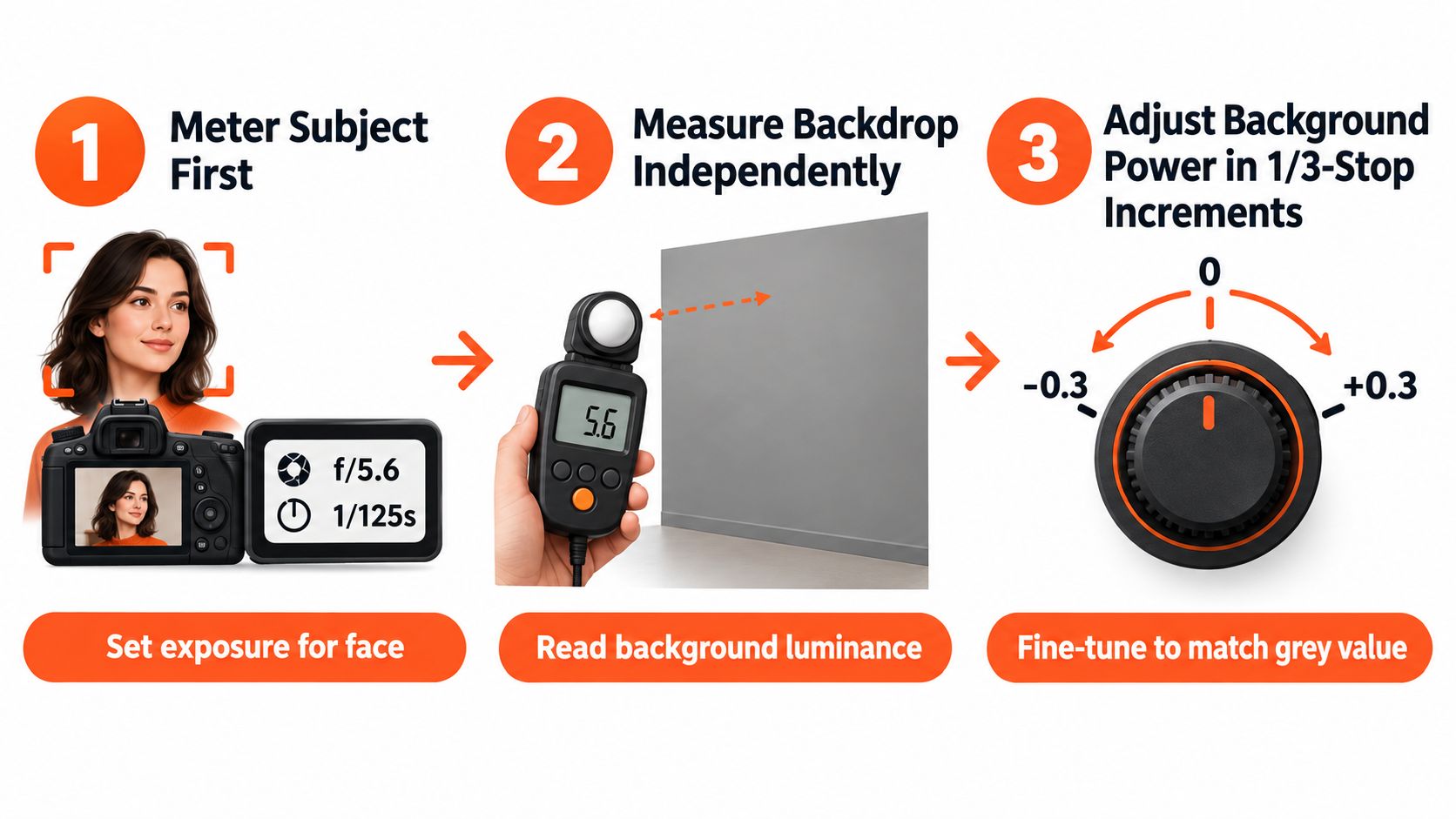
The tonal relationship is predictable. Grey exposed about the same as the subject records as middle grey. Light it approximately 2 stops brighter, and it reads as white. Keep it around 1.5–2 stops darker, and it moves toward dark grey or black. The backdrop has not changed. The exposure has. That control lets teams keep a light, medium, charcoal, or gradient grey consistent across roles and platform crops.
Use this order:
- Meter the subject first. Establish the face exposure before changing background power.
- Measure the backdrop independently. Aim the meter at the grey surface and check the area behind the head and shoulders.
- Adjust in 1/3-stop increments. Small changes preserve separation. Large jumps can make the background look pasted in or pull attention from the face.
For facial modeling, place the key light 30–45° off-axis. Keep fill 1–2 stops lower than the key so the face retains shape. A practical baseline is 85 mm, f/5.6, 1/160 s, ISO 100, and 5600K. Adjust it for the subject, lens, room, and strobe system.
Spill causes many grey backgrounds to look dirty. If the key light washes across the backdrop, it can create an uncontrolled gradient and shift the apparent color. Keep enough distance between subject and background to manage both exposures independently. That distance also reduces unwanted shadow and gives hair a cleaner edge.
For face-first setup guidance, use this reference on lighting for professional headshots. Correct the face before refining grey. A controlled background cannot fix flat eyes, a heavy chin shadow, or uneven skin color.
Wardrobe Hair and Contrast That Keep You Separated
Grey succeeds or fails at the outline. If the viewer can't quickly distinguish hair, jaw, shoulders, and jacket from the backdrop, the portrait loses authority before retouching begins.
Dark hair against light grey is dependable. Blonde hair against light grey needs more care, particularly when the clothing is also pale. Dark hair, a charcoal jacket, and a charcoal background create the most predictable failure. The face may remain visible while the shoulders and silhouette disappear.
Mid-grey around #6E7177 gives many people a useful middle ground. It avoids the glare of white and the compression of black, while preserving enough difference for varied skin tones and clothing. The key is not matching the background to the outfit. It's creating an intentional relationship between them.
Use the viewfinder as a fast diagnostic:
- Dark hair or beard: Choose light or medium grey, or add controlled edge separation.
- Light hair: Use medium grey or charcoal if the clothing stays distinct.
- Black, navy, or charcoal wardrobe: Avoid charcoal without extra distance or separation light.
- Glasses: Check that frame edges don't vanish into the background, especially near the temples.
- Bright clothing: Medium grey usually gives more control than pure white.
A small change in distance often works better than aggressive retouching. Move the subject away from the backdrop and the background loses definition while the shoulders gain a cleaner edge. A restrained separation light can also trace the hair and jacket without creating a visible halo.
Wardrobe should support the role. A lawyer or finance executive can use charcoal with a lighter shirt to create a firm, controlled portrait. A consultant or recruiter often benefits from medium grey and a navy or muted jacket. A creative director can use light grey with a more personal color choice, provided the face remains the strongest visual element.
For clothing selection before capture, use this practical guide to the best outfit for professional headshots. The background doesn't need to match the clothing. It needs to let the clothing frame the person.
Retouching and AI Edits That Preserve True Grey
Retouching should correct grey, not reinterpret it. In sRGB, a true neutral such as #808080 has equal red, green, and blue values. If one channel drifts, the backdrop can look beige, blue, or green. That cast may also reflect onto the subject and alter skin color.
Start with exposure before changing saturation. 18% reflectance is the familiar middle-grey benchmark used by camera metering systems. If the surface records too bright, check the light, distance, and exposure first. Consumer backdrops labeled grey can reflect 25–35% of incident light, so they may appear brighter than expected and vary between sessions (this studio backdrop guide explains why consumer grey can expose brighter).
White balance must remain stable across a set. 5600K is a useful starting point for a daylight-balanced studio, but the correct value comes from the actual light source and a neutral reference. Do not warm the entire image to make skin feel livelier if the backdrop turns cream. Correct the face and background as connected color problems.
Inspect the final crop, not only the full-resolution file. Hair, glasses, earrings, shoulders, and jacket collars need clean edges at display size. A smooth grey field paired with a rough mask looks artificial. Subtle matte texture can remain believable. Folds, hotspots, and dirty gradients make team portraits harder to match.
AI cleanup should preserve the selected grey tone, gradient, and subject separation. Use AI photo retouching for controlled cleanup, then check neutral areas, hair edges, and skin transitions manually. Remove temporary blemishes and distractions without smoothing facial structure or pushing the background toward a generic studio effect.
AiHeadshots provides one practical option when a shared studio session is difficult. Customers upload 10–20 phone selfies and receive 30+ studio-grade headshots in about 30 minutes, with grey among the available background treatments. AiHeadshots comes from Studio Pod, an automated headshot studio in Houston founded by photographers Joseph West and Chris Bailey, who have photographed 10,000+ real professionals since 2019. The workflow is built around photographer judgment rather than a software team retrofitting open models.
Pricing is Basic at $29, Professional at $39, and Executive at $59, with Teams volume pricing of $22–29 per seat for 10 or more seats. The service provides a 100% money-back guarantee within 14 days. Its stated retention policy is 7 days for inputs, 30 days for outputs, and 90 days for billing data.
Grey Headshot Looks by Profession and Final Checklist
A corporate team usually needs medium grey. It keeps the grid cohesive across different wardrobes and complexions without forcing every person into the same expression. A subtle gradient works when the company wants a more current finish but still needs the portraits to read as one system.
An executive or law-firm partner can use charcoal, provided the shirt, hair, and shoulder line remain separated. Finance and legal profiles benefit from the authority of a darker neutral, while a realtor or consultant often gets more mileage from light or medium grey. Those shades feel credible in a profile circle and approachable in a client directory.
Actors and creative professionals have more room for a gradient or a carefully chosen light grey. The image still needs a clear face and clean silhouette. A background that announces itself as a design treatment narrows reuse, so reserve stronger styling for a portfolio or campaign where the visual identity is intentional.
Before approving the final file, check:
- Shade: The grey supports the role instead of competing with it.
- Separation: Hair, glasses, jawline, shoulders, and clothing remain readable.
- Crop: The face stays centered and clean inside a circular profile frame.
- Color: Neutral areas remain neutral, with no warm, cool, or green cast.
- Consistency: Team portraits share comparable tone, contrast, and edge quality.
- Reuse: The image works for LinkedIn, biographies, directories, and email profiles.
AiHeadshots has served 30,000+ customers, delivered 255,000+ headshots, and carries a 4.9-star rating. Those figures describe the product's current scale, while the photographer-led heritage explains the visual standard behind the grey background choices. Browse AiHeadshots reviews and professional headshot examples before selecting a tone for an individual or team.
Upload 10 selfies, choose grey backgrounds alongside your preferred look, and receive 30+ professional headshots in about 30 minutes. Visit AiHeadshots to compare the $29 starting option or arrange consistent portraits for your team.
