



A professional AI headshot is no longer a novelty. It's a studio-style portrait created from 10 to 20 phone selfies, without a studio visit, and delivered in about 30 minutes. The key question isn't whether the image looks polished. It's whether the lighting, retouching, and likeness hold up when a recruiter, client, or colleague sees it for the first time.
LinkedIn reports that profiles with a photo can receive up to 14 times more profile views, 21 times more views, and up to 36% more connection requests or messages than profiles without one, as summarized in LinkedIn profile photo research. Another reported hiring metric says 86% of recruiters and hiring managers spend 30 seconds or less on an initial profile scan, so your portrait has very little time to establish recognition and credibility.
Table of Contents
- Introduction What Professional AI Headshots Actually Are
- How AI Headshots Work From Selfies to Studio Results
- AI Headshots Versus a Traditional Photographer
- How to Evaluate Quality Lighting Retouching and Likeness
- Where Professional AI Headshots Get Used Most
- How to Choose the Right AI Headshot Provider
- Getting a Result You Can Trust and What to Do Next
Introduction What Professional AI Headshots Actually Are
Professional AI headshots turn ordinary selfies into a set of portraits with controlled studio lighting, professional framing, styled clothing, and clean backgrounds. You upload a range of recent images. The system studies your facial structure and generates multiple finished options. You choose the portraits that still look like you, only photographed under better conditions.
That distinction matters. A convincing headshot isn't just a sharp face placed against a blurred background. A photographer looks for light direction, shadow shape, skin texture, eye reflections, hair detail, posture, and the small features that make a person recognizable. An image can look expensive and still fail if it changes your jawline, eye spacing, smile, or age.
We built AiHeadshots from that photography perspective. AiHeadshots is the product from Studio Pod, an automated headshot studio in Houston. Joseph West and Chris Bailey founded Studio Pod, and the team has photographed 10,000+ real professionals since 2019. We're photographers who built an AI, not a software team retrofitting open models.
That heritage shapes the standard. The point is not to produce an attractive stranger. The point is to create a credible version of you for LinkedIn, a company directory, an executive biography, or a client-facing profile.
The trade-off is straightforward. AI headshots offer speed, lower cost, and many variations. A photographer offers live direction, immediate adjustments, and direct control over the session. For routine professional profiles and distributed teams, AI is often the practical choice. For a campaign, editorial portrait, or high-stakes personal brand shoot, an in-person photographer still has a clear advantage.
The rest comes down to judgment. You need to know how to prepare selfies, inspect the finished image, compare providers, and recognize the point where realism stops being likeness.
How AI Headshots Work From Selfies to Studio Results
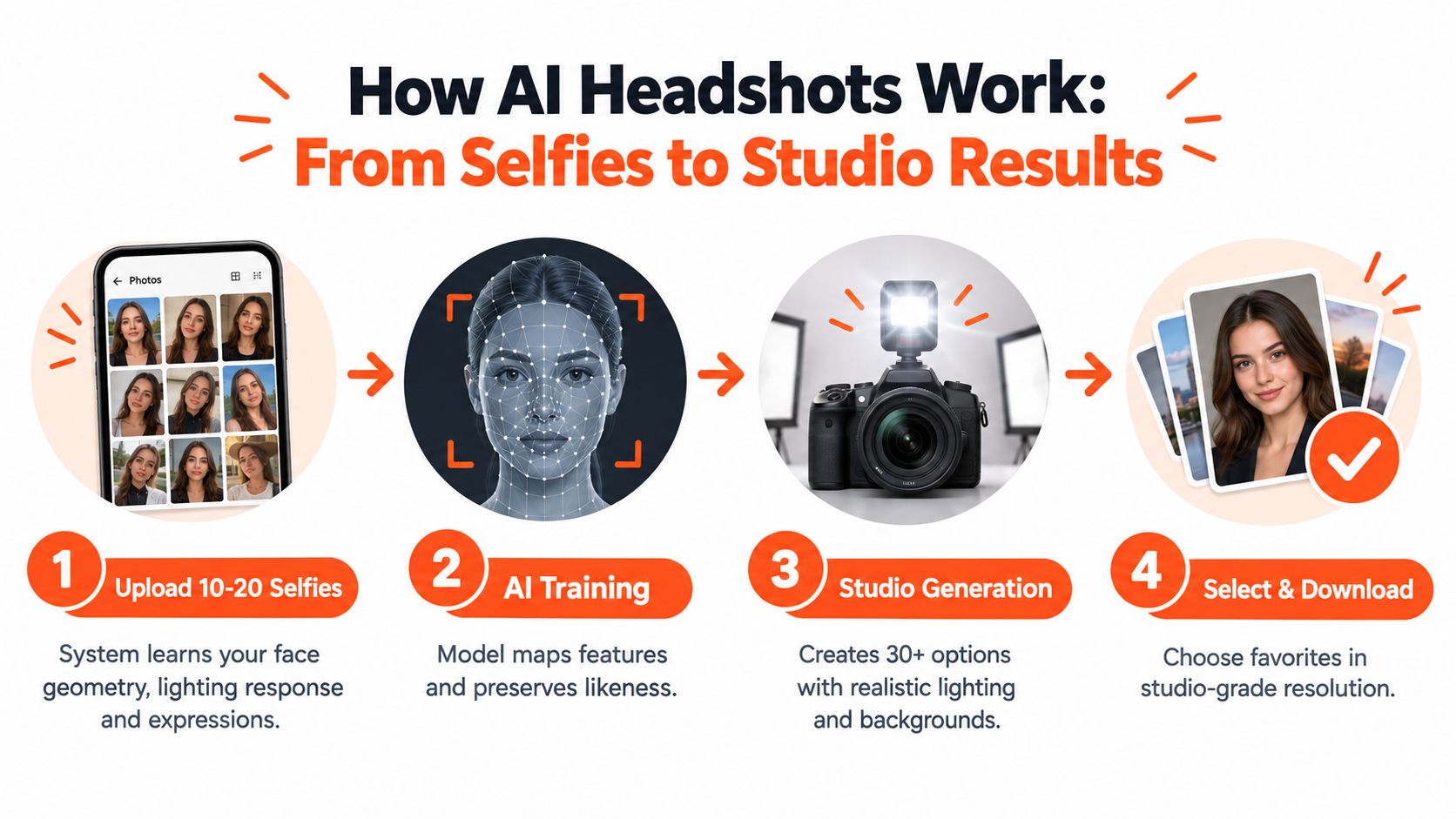
Your selfies act as visual references. They show AiHeadshots the stable details of your face, including the relationship between your eyes, nose, mouth, jaw, hairline, and ears. They also reveal how your face appears under different expressions, angles, and light.
A single selfie gives limited information. A varied set gives more context. Use recent photos with different viewpoints and natural expressions. Avoid heavy filters, group photos, sunglasses, and images where your face is partly hidden. The system can't faithfully preserve details it can't see.
The process is similar to a photographer reviewing a contact sheet after a studio session. A contact sheet contains many frames from one shoot. The photographer studies which expression, angle, and light reveal the subject best. AiHeadshots applies a comparable selection logic at scale, then creates finished portraits with controlled visual conditions.
What the system learns
Your uploads help the system map your facial geometry and expression range. They also help establish details such as skin tone, hair shape, and the way shadows fall across your features. Better references give the system a clearer identity target.
AiHeadshots delivers 30+ studio-grade headshots in about 30 minutes. The output varies the setting while maintaining a professional portrait structure. Lighting, clothing, background, framing, and retouching are controlled elements. Your identity is the element that must remain stable.
That boundary is where users often get confused. A system can change a casual shirt into business attire. It can place you against a neutral studio background. It can create softer light and a more deliberate expression. It can't invent a missing facial feature accurately without risking likeness drift.
Our explanation of how AI headshots work shows the workflow in more detail. The useful principle is simple. Give the system enough visual evidence, then judge every final portrait against your actual face.
Here's a short visual explanation of the workflow:
AI Headshots Versus a Traditional Photographer
The choice between AI and a photographer depends on what you need the portrait to do. A traditional session gives you direction in real time. You can adjust your posture, expression, wardrobe, and position under the photographer's eye. You also coordinate travel, scheduling, styling, and delivery.
A conventional photographer often charges a $300 to $600+ day rate, while a traditional professional headshot can cost $150 to $650 and take one to three weeks from booking to finished files, according to the industry comparison provided for this guide. AiHeadshots offers Basic at $29, Professional at $39, and Executive at $59. Teams receive volume pricing of $22 to $29 per seat at 10+ seats, with delivery in about 30 minutes.
| Criteria | AiHeadshots | Traditional Photographer |
|---|---|---|
| Input | 10 to 20 phone selfies | In-person studio or location session |
| Delivery | 30+ portraits in about 30 minutes | Finished images after the session and editing |
| Cost | Basic $29, Professional $39, Executive $59 | $150 to $650 total, with photographer day rates of $300 to $600+ |
| Direction | Choose from generated options | Live posing and expression guidance |
| Scale | Consistent outputs for teams | Separate scheduling for each person |
| Best fit | LinkedIn, directories, recruiting, distributed teams | Editorial, campaign, executive portrait direction |
The price difference changes the workflow. At $29, you can iterate without planning a full production. A team can give every employee a consistent visual standard without bringing everyone to one location. A recruiter can refresh a profile on a short timeline.
Photographer's rule: Speed matters only after likeness passes inspection.
A photographer wins when the subject needs active coaching or when the portrait carries a campaign-level creative brief. A lawyer preparing a firm leadership portrait, a doctor commissioning a practice campaign, or an executive preparing a magazine feature may need direction that an automated workflow doesn't provide.
AI wins on repetition and access. It removes scheduling friction, creates several usable options, and supports distributed teams. The product heritage matters here. We use photography standards shaped by Studio Pod's work with real professionals, rather than treating a headshot as a generic image-generation task. For a deeper cost and use-case analysis, see whether AI headshots are worth it.
How to Evaluate Quality Lighting Retouching and Likeness
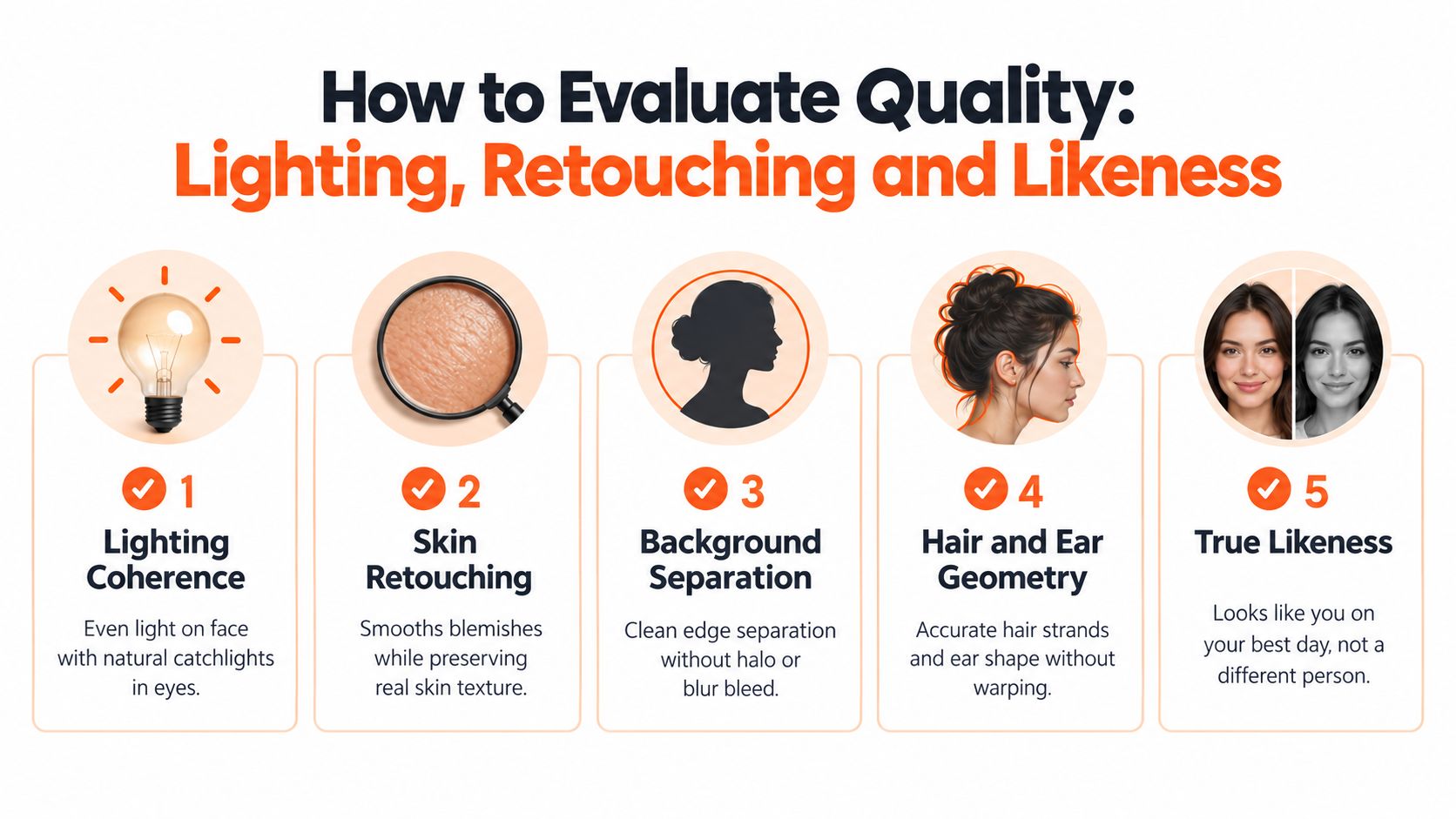
Start with the eyes. Catchlights should make sense for the apparent light source. If the face is lit from the left, the highlights and shadows should support that direction. A portrait fails quickly when the eyes show one light setup while the nose, cheeks, and neck show another.
Look at the transition between light and shadow. Professional lighting doesn't mean every part of the face is equally bright. It means the contrast feels intentional. Watch for glowing skin, a pasted-on face, or shadows that stop abruptly at the jaw.
Retouching needs restraint. Good retouching reduces temporary blemishes while preserving pores, fine lines, and natural variation. Over-retouching removes the visual information that makes a face feel real. The result starts to resemble a beauty filter instead of a professional photograph.
Inspect the small details
Whole-image sharpness can hide local defects. Portrait evaluation research now treats technical distortion, AI-specific distortion, and aesthetics as separate concerns. The Q-Bench-Portrait benchmark contains 2,765 image-question-answer triplets, covering natural, synthetic-distortion, AI-generated, artistic, and computer-graphics portraits, as described in portrait benchmark research.
Use that thinking when you inspect a result. Zoom into the ears, hairline, teeth, collar, and eye reflections. Check for warped ear geometry, hair strands that merge unnaturally, inconsistent catchlights, halos around the shoulders, or background blur bleeding into the hair.
Then compare the portrait with a real photo taken recently. Don't compare only the general impression. Compare the distance between the eyes, the shape of the nose, the width of the mouth, the chin, and the way your smile changes your cheeks.
A 2024 ANU-led study found participants identified AI-generated people versus real people with 61% accuracy, showing how difficult classification becomes when facial cues appear realistic. The study also reported an uneven result across demographic groups, with white AI-generated faces judged more real than real human faces, while the same effect didn't hold for people of color, as discussed in research on AI face realism.
Test several outputs across skin tones, ages, gender presentations, and lighting conditions. A professional result should look like you on your best day, not like a different person with a similar haircut.
Where Professional AI Headshots Get Used Most
LinkedIn is the obvious starting point. A recruiter scans a profile quickly. A client sees your face before reading your experience. A polished portrait won't replace strong credentials, but it establishes a visual baseline that supports the rest of the profile.
A consultant updating a profile after changing roles may need a formal image for LinkedIn and a warmer version for a personal website. A realtor may want an approachable portrait for local marketing. A doctor or lawyer may need a composed, credible image for a practice page. The useful output is not the most dramatic style. It's the one that matches the trust level your work requires.
Teams need visual consistency
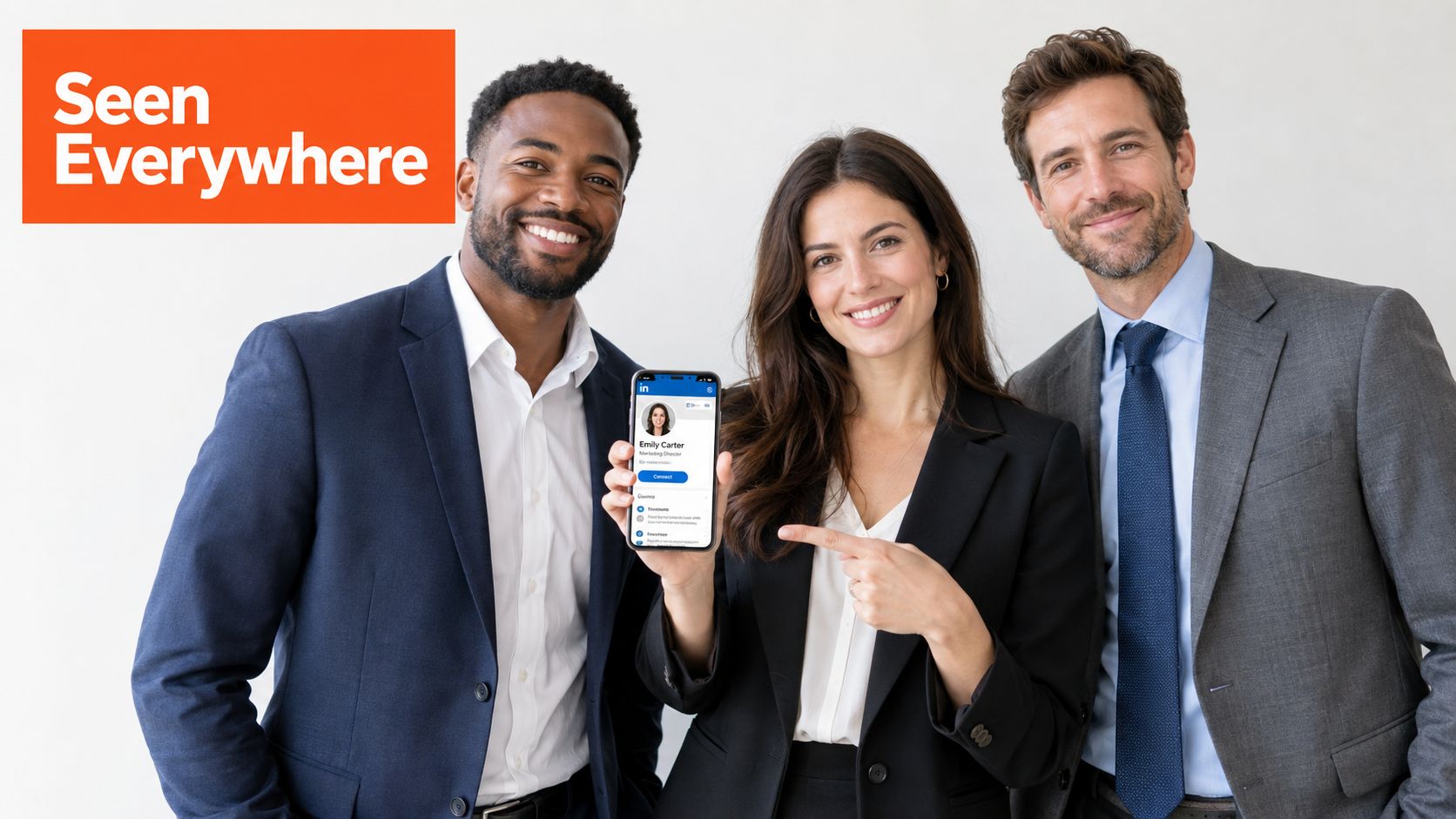
Distributed companies face a different problem. Employees take profile photos in different rooms, under different lights, with different cameras. The directory becomes visually uneven. One person has a studio portrait. Another has a cropped holiday photo. A third uses a webcam frame.
A consistent AI workflow gives teams a shared starting point. HR can define acceptable backgrounds, wardrobe expectations, and framing. Employees still upload their own selfies, so the result remains personal rather than using a generic employee template. AiHeadshots supports team workflows for companies that need coordinated headshots across directories, presentations, and internal profiles.
Recruiters also benefit from short production cycles. A hiring team can refresh candidate-facing staff portraits without coordinating a physical shoot. Job seekers can replace an outdated image when the rest of their professional materials are ready.
Your headshot should match the context, not compete with it.
For broader guidance on keeping profiles, bios, and public-facing details consistent, read this online presence management guide. For LinkedIn-specific recommendations, see AI headshots for LinkedIn.
How to Choose the Right AI Headshot Provider
Provider selection starts before you compare styles. Ask who built the workflow and what quality standard shaped it. Studio Pod has photographed 10,000+ real professionals since 2019, and AiHeadshots comes from that photography practice. That doesn't guarantee every generated image is usable. It does tell you the product was developed around portrait decisions rather than generic image generation.
Review examples at the size you'll use. Look for natural skin texture, clean hair edges, believable hands if hands appear, and backgrounds that don't pull attention away from the face. Check several subjects, not one carefully selected example. The AiHeadshots examples page gives you a starting point for comparing styles.
Pricing should be visible before upload. AiHeadshots offers Basic for $29, Professional for $39, Executive for $59, and team pricing of $22 to $29 per seat at 10+ seats. The service also offers a 100% money-back guarantee within 14 days. Review pricing details, customer reviews, and team options before choosing a package.
Privacy deserves the same scrutiny as image quality
Read the retention policy. AiHeadshots states that uploaded selfies are deleted within 7 days of headshot generation, generated headshots are retained for 30 days after delivery, and account information is kept for 90 days after deletion for billing records before permanent deletion, according to its published privacy policy.
Published retention windows vary across services. Industry privacy guidance recommends short storage periods, with raw uploads and associated models retained for about 7 days for sensitive employee photos, as outlined in AI headshot privacy guidance. Another privacy overview notes that providers publish timelines ranging from 24 hours to 30 days after processing, while some keep outputs indefinitely unless users delete them manually, as explained in what happens to uploaded headshot photos.
For teams, test identity consistency across different employees. Check skin tone, age, hair texture, body type, and gender presentation. A uniform brand standard should not produce uniform faces.
Getting a Result You Can Trust and What to Do Next
Trust starts with recognition. Your colleagues should identify you immediately. A recruiter should see a polished portrait, then recognize the same person in a video call or interview. Realism without identity consistency is a failure, even if the image looks technically impressive.
The standard also changes when AI use is disclosed. One 2025 hiring-professional survey reported that recruiters preferred AI headshots in blind tests, but that preference fell sharply when the images were labeled AI-generated, as summarized in coverage of AI headshots for LinkedIn. This creates a practical distinction. An image can pass a visual test and still raise questions if it looks unlike the person or implies a level of authenticity it doesn't have.
Use an AI headshot when you need a fast, credible portrait for a profile, directory, recruiting workflow, or professional bio. Choose a photographer when the session itself matters, when you need live direction, or when the image carries a campaign or editorial brief.
Before publishing, inspect the portrait at its final crop. Check the eyes, ears, hairline, skin texture, jaw, collar, and background edge. If your face has drifted, reject the image. More options don't compensate for a loss of likeness.
The best professional AI headshot is recognizable, restrained, and appropriate to your work. It should look like you on a well-lit day, not like an invented version built from generic professional signals.
AiHeadshots gives you 30+ studio-grade portraits from 10 to 20 phone selfies, with results delivered in about 30 minutes. Upload your selfies, review the lighting and likeness, and choose the image that fits your professional profile. Visit AiHeadshots to see your options.
