



Choose a professional headshot creator that preserves your recognizable features, controls lighting and crop, explains its retouching, and publishes clear price and data-retention terms, rather than one that only promises more generated variants. The cost anchor is direct. A conventional photographer can charge $300 to $600 or more for a day rate, while the AiHeadshots Basic tier is $29.
That price gap doesn't settle the decision. It raises the right question. You're buying a photograph that represents you in hiring, client work, and company directories, and software is only the production method. Judge the portrait first.
Table of Contents
- Why Photography Comes Before AI
- What a Professional Headshot Creator Does
- The Features That Control Headshot Quality
- Examples for Individuals and Teams
- How the Professional Headshot Workflow Works
- Photographer Sessions Versus AI Headshots
- Protect Identity, Consent, and Personal Data
- Choose With a Clear Decision Checklist
Why Photography Comes Before AI
More generation doesn't create a better portrait. A professional headshot creator fails its first test when the subject looks polished but unrecognizable, unevenly lit, or framed too loosely for a small profile crop. Feature checklists hide that failure. They count outputs, styles, and backgrounds while skipping identity, light, expression, and composition.
We apply the same standard we use in a studio. Check whether both eyes carry detail, shadows follow one plausible light source, skin retains texture, and the head remains legible at avatar size. Then compare speed, price, and controls. That order matters because a fast batch of weak portraits only gives you more files to reject.
The evidence starts with presentation
A 2020 peer-reviewed study on professional photographs is available through research on photographic presentation and perceived competence. People shown smiling were perceived as more competent than people with neutral expressions, while a thinking pose received the lowest competence evaluations. In that sample, 55% had previously participated in hiring employees, yet hiring experience didn't eliminate the effect.
That doesn't mean a portrait replaces qualifications. It means expression, posture, and framing shape judgment before a viewer reaches your work history. Our position comes from Studio Pod, our automated Houston studio founded by photographers Joseph West and Chris Bailey, which has photographed more than 10,000 real professionals since 2019. We're photographers who built an AI service, not a software team adding photography language afterward.
Judge identity, lighting, expression, crop, retouching, and data practices before you compare generation counts.
What a Professional Headshot Creator Does
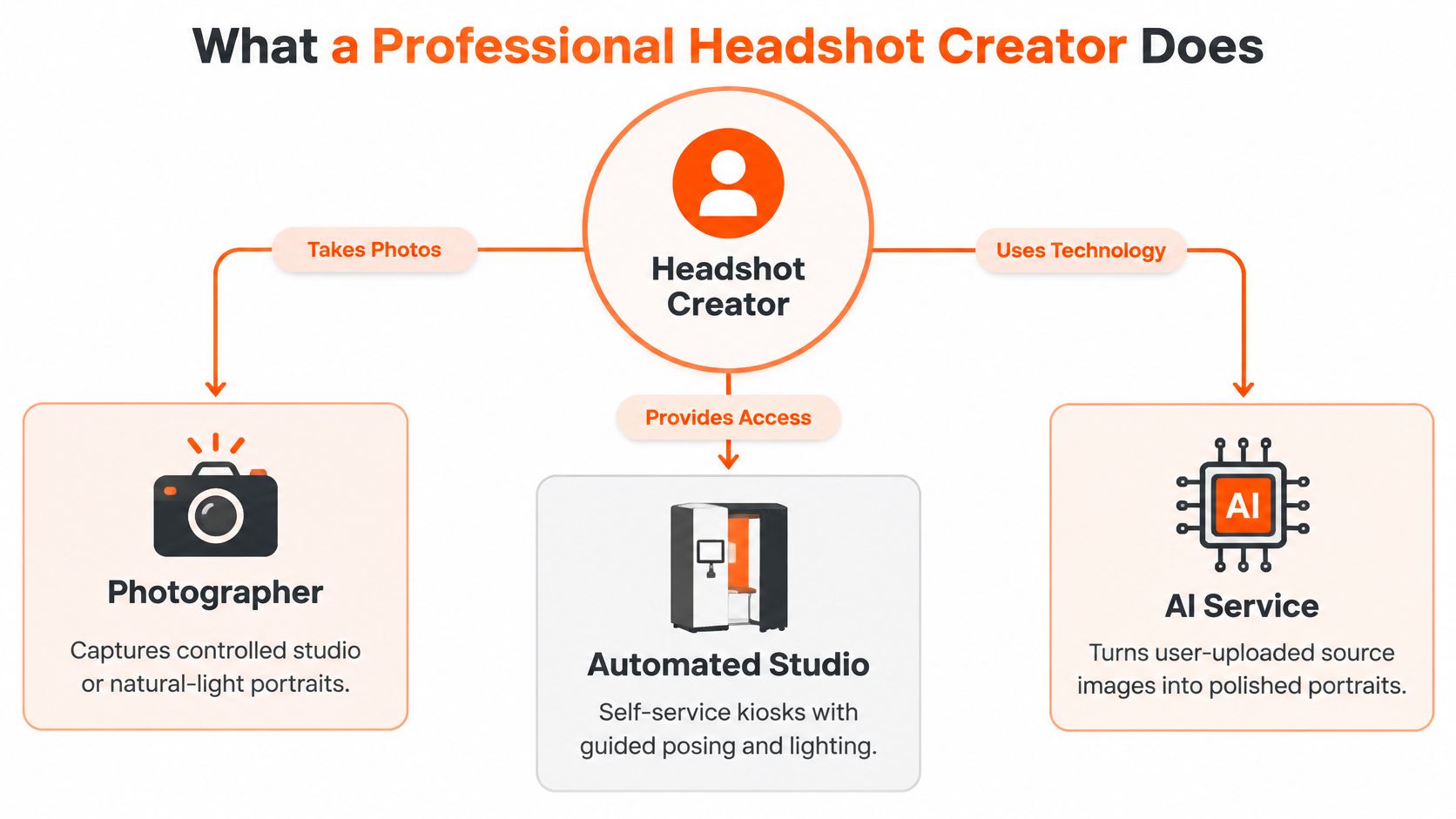
A professional headshot creator can be a photographer with a camera, an automated studio, or an AI service that builds portraits from source images you provide. The label matters less than the job. Each must prepare the subject, control light and expression, manage framing and background, retouch with restraint, and deliver files that work on LinkedIn, in directories, and on client-facing pages.
The map below separates the three production routes by how they capture or construct the portrait.
Generation isn't a filter
A filter sits on top of one existing photo. A serious AI service interprets facial geometry across several inputs, rebuilds consistent lighting, places the subject in a controlled composition, and produces selectable variants. That power creates the central risk. The system can improve presentation, or it can replace the person with a smoother approximation.
Our workflow is concrete. With AiHeadshots, you upload 10 to 20 phone selfies and receive more than 30 studio-grade headshots in approximately 30 minutes without a studio visit. You still do the photographer's selection work. You compare gaze, expression, crop, wardrobe, and background, then reject anything that doesn't look like you.
This short video shows the input and output relationship in practical terms, from casual source photos to finished portraits.
Use cases change the specification. A lawyer needs restraint and directness. A consultant needs approachability without casual cues. For agents whose photo appears beside listings and yard signs, this overview of real estate headshot photography shows how local market presentation shapes wardrobe and setting choices. The production route changes, but the professional requirements don't.
The Features That Control Headshot Quality
Start with lighting, because weak lighting can't be rescued by sharpness. Research on face authentication and directional lighting found that strong directional light from below produced the largest performance degradation, while top-left and top-right lighting had smaller effects. Uneven illumination changes apparent facial geometry and contrast, which affects both machine matching and ordinary human readability.
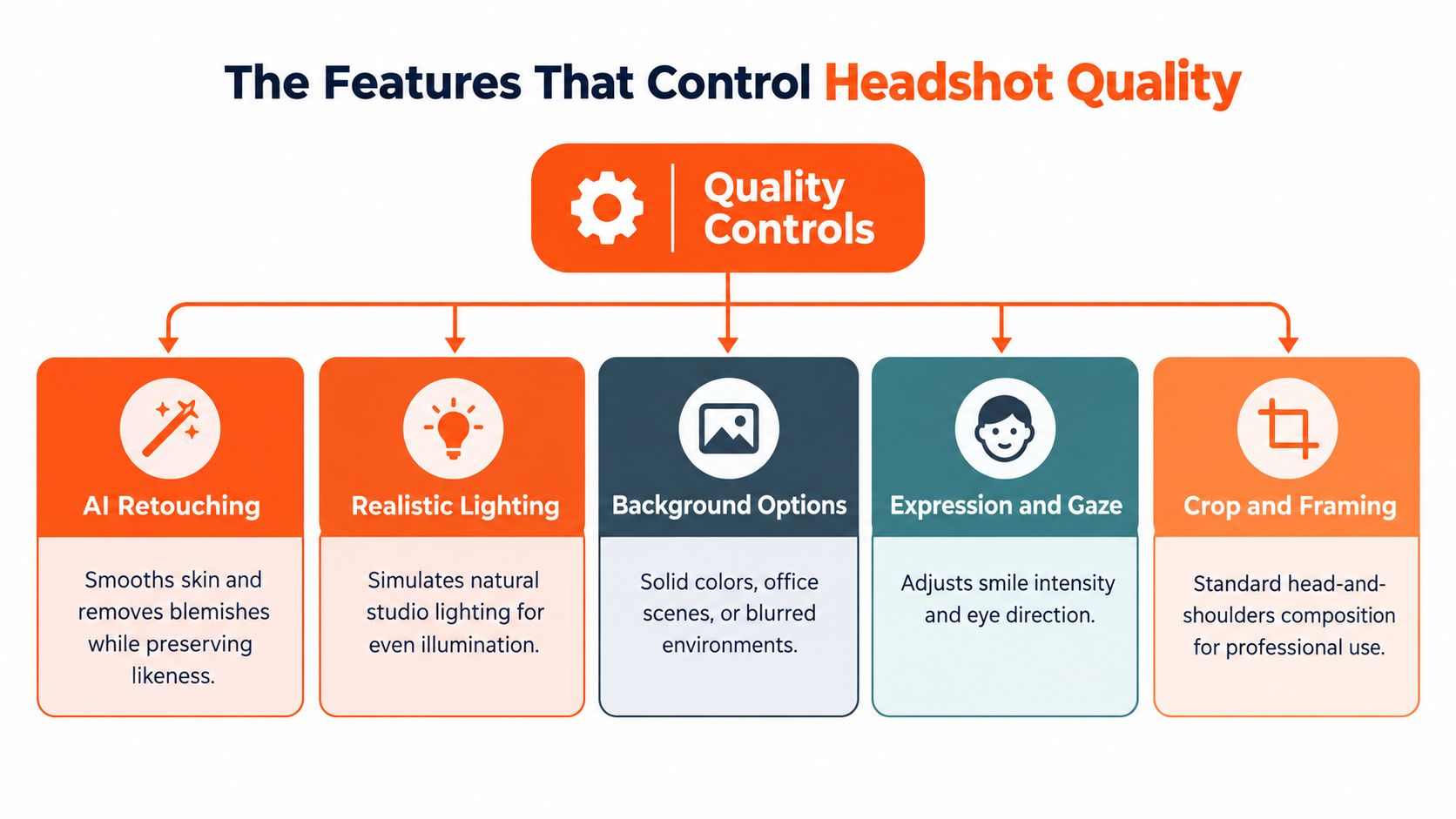
The diagram below groups the controls we'd inspect before trusting any service with a public portrait.
Light, eyes, and skin
Demand large, diffused frontal or slightly raised key light, controlled fill, and consistent exposure across both cheeks. This practical lighting setup guide explains the physical logic behind soft sources and fill placement, and the same logic applies when a system simulates a studio. Catchlights should agree with the key light. Eye direction should look anatomically plausible, not enlarged, over-whitened, or pasted into place.
Retouching has a narrow job. Remove temporary distractions, control shine, and clean stray hair without erasing pores, changing bone structure, or flattening age out of the face. Aggressive relighting creates asymmetric shadows and clipped highlights on the forehead or nose. Once those artifacts appear, technical sharpness stops mattering because the portrait reads as manufactured.
Backgrounds and batch controls
Backgrounds should create separation, not compete for attention. A neutral wall, restrained office, or softly blurred context works when edges around hair, glasses, and shoulders stay clean. Test every preset across skin tones, face shapes, hair colors, and glasses before a company rollout.
Acceptance test: even cheek exposure, visible eye detail, natural shadows, recognizable skin, and no clipped highlights.
Team controls must lock crop, head size, camera angle, gaze direction, expression range, background treatment, and color rendering. Allow limited personal variation inside those standards. Uniformity without individuality looks staged, while unrestricted variation turns a company page into unrelated photos that happen to share a logo.
Examples for Individuals and Teams
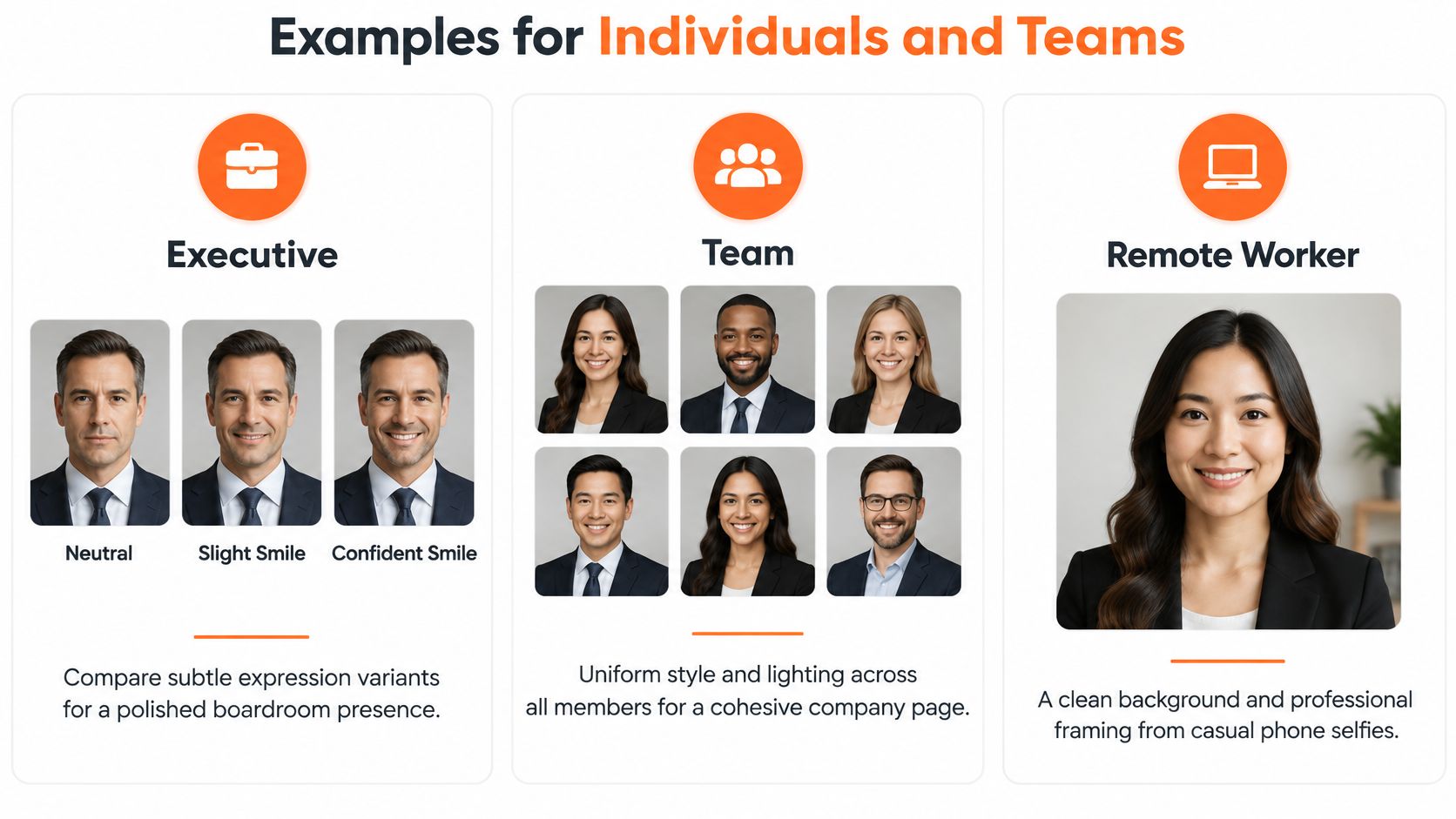
An executive doesn't need dozens of unrelated looks. She needs controlled variants she can compare directly. Hold lighting, gaze, wardrobe, and crop stable, then test a neutral expression, a slight smile, and a confident smile. The right choice depends on context. A board profile usually calls for restraint, while client-facing consulting calls for visible approachability.
That preference isn't guesswork. In a study of seven LinkedIn photographs representing the same candidate, smiling and direct eye contact positively influenced perceived credibility. Generate expression as a controlled variable. Don't let a system randomize it and call the result variety.
The comparison below shows how individual selection differs from a coordinated team set.
What to inspect in practice
A recruiter updating a profile should preview both square and circular crops at the size they'll appear. A reported eye-tracking summary on recruiter profile review puts initial review at about 6 to 7.4 seconds, with roughly 19% of that time directed at the profile photo. Your face has about 1.4 seconds in that account. Loose framing wastes it.
A consultant can test a neutral background against a restrained office setting while keeping the same face, expression, and light. That isolates the background decision. Reject any version where hair edges dissolve, shoulders cut awkwardly, or the setting implies an office or credential the person doesn't have.
For a distributed company, our team headshot workflow should be judged as a grid, not as isolated portraits. Open twenty images together. Head sizes should align, color should stay consistent, and every person should still look like themselves. One flattering outlier doesn't make a usable company system.
How the Professional Headshot Workflow Works
Start by naming the placement. LinkedIn, a speaker page, a medical directory, and a law firm bio don't ask for identical formality, crop, or background. Inspect a provider's real examples in that context before you upload anything. If the examples only show one age range, one skin tone, or one hair type, you haven't seen enough evidence.
Prepare inputs like a shoot
Gather 10 to 20 recent phone selfies with varied angles and expressions. Use plain light where possible, remove sunglasses and heavy filters, and include your current hair and glasses if you normally wear them. Old photos create an identity problem before generation begins. You're asking the system to represent you now, not reconstruct an earlier version of you.
Generation should produce controlled looks, not an unfiltered pile. Change one category at a time where the service allows it. Compare expressions within one background, then compare backgrounds within one expression. That discipline tells you which variable helps and which variable pushes the portrait away from your actual appearance.
Review before you download
Zoom in. Are the eyes aligned. Do the teeth look natural. Do glasses sit correctly on the face. Does skin texture survive. Are shadows consistent with one light source. Does the circular crop cut into hair or chin. Are background edges clean around earrings, curls, and shoulders.
Selection rule: if a colleague wouldn't recognize you from the thumbnail, reject the file no matter how polished it looks full size.
Download the crops you'll use and keep an unedited source set with your records. Speed helps only when review stays in the workflow. A thirty-minute turnaround that skips identity checks moves the error faster. It doesn't remove the error.
Photographer Sessions Versus AI Headshots
A live photographer gives you direction in the room. You get physical capture, immediate pose correction, controlled light placed around your actual face, and a person watching for collar, posture, and expression problems as they happen. You also take on scheduling, travel, preparation time, and a $300 to $600-plus day rate before you account for coordinating a whole team.
An AI service removes the appointment and location work. You upload selfies, generate variants quickly, and repeat the process without gathering people in one place. The trade-off is equally clear. Nobody stands beside you to correct posture or notice that your source photos all carry the same unflattering angle. Input quality and final review become your responsibility.
Our published tiers are Basic $29, Professional $39, and Executive $59, with Teams volume pricing of $22 to $29 per seat at 10 or more seats. Services such as HeadshotPro, BetterPic, Aragon, Secta, and ProPhotos compete in this category, and we'd judge all of them by examples, likeness, controls, delivery, and retention terms rather than feature slogans. Our distinction is the Studio Pod photography practice behind the system, paired with a thirty-minute delivery target.
| Decision factor | Traditional photographer session | AiHeadshots |
|---|---|---|
| Cost | $300 to $600-plus day rate | $29 Basic for an individual |
| Direction | Live posing and expression coaching | Self-guided input and selection |
| Scheduling | Appointment and travel required | Upload from any location |
| Volume | Limited by shoot time and selection | More than 30 outputs per person |
| Team consistency | Strong when everyone uses one setup | Standard presets across distributed staff |
| Best fit | High-stakes capture needing in-room art direction | Fast profile updates and distributed teams |
Read our direct comparison of AI headshots and photographer sessions if live direction is your main concern. Neither format wins every job. Choose the photographer when physical presence and directed capture matter most. Choose AI when deadline, geography, repeatability, and per-seat cost control the decision.
Protect Identity, Consent, and Personal Data
A convincing image can still create a trust problem. Recruiter research on AI headshot preference and disclosure reported that 76.5% of 1,087 recruiters preferred AI-generated headshots in blind comparisons, while only 39.5% correctly identified them. Once recruiters knew an image was AI-generated, 66% said they would be put off. Visual quality and disclosed origin pull in opposite directions.
Draw a hard line between enhancement and invention. Cleaning light, background, and temporary blemishes preserves a genuine likeness. Changing age, facial structure, hair, skin, body shape, or expression beyond recognition creates a different claim about who you are. Fabricated settings and credentials create the same problem, even when the face itself stays accurate.
Consent and retention need specifics
Employers shouldn't generate standardized portraits for staff without consent, review, and a route to reject an output. Follow your company disclosure policy where one exists, and retain the original inputs and approved outputs so the source of a published image can be checked. This explanation of AI face search limitations is a useful reminder that facial systems don't treat identity as an exact science, which strengthens the case for human review before publication.
Preserve recognizable identity, avoid invented appearance changes, disclose where policy requires it, and keep records of what was approved.
Retention should follow purpose, not storage convenience. The UK Information Commissioner's Office guidance on storage limitation says personal data should remain identifiable only for as long as necessary for its processing purpose. Our published schedule separates the categories, with 7-day input retention, 30-day output retention, and 90-day billing retention.
Those periods aren't a universal legal requirement, and we don't present them as one. They're a clear timetable you can evaluate before uploading. You can read our privacy information alongside the product terms, and you should ask any provider the same category-by-category question. Vague language about keeping data to improve services isn't a retention policy.
Independent context supports taking presentation and privacy together. CareerBuilder hiring survey reporting on social screening reported that 70% of employers screen candidates through social media and more than 50% had rejected applicants because of something found online. Your portrait will be reviewed. Make sure it's accurate enough to defend.
Choose With a Clear Decision Checklist
Review actual examples first, at full size and at profile size. Then verify identity preservation, lighting, expression, retouching restraint, backgrounds, crop control, delivery time, total price, consent terms, retention periods, and refund terms. Don't buy from a gallery that hides eyes, hair edges, glasses, or skin texture behind small thumbnails.
For an individual, prioritize a natural likeness, usable crops, and fast delivery. For a team, prioritize shared standards, approval control, and per-seat economics. For a portrait that needs live posing, precise wardrobe handling, or a photographer responding to you in real time, book the studio session and pay the day rate. Don't ask an AI service to pretend it offered something it didn't.
Our proof points are specific. AiHeadshots comes from Studio Pod's photography practice, delivers more than 30 headshots in approximately 30 minutes, and provides a 100% money-back guarantee within 14 days, with more than 30,000 customers served, more than 255,000 headshots delivered, and a 4.9-star rating. Those numbers don't prove a photo will change a hiring outcome. They tell you the service has operating history, published terms, and a refund route if the likeness fails.
Upload 10 selfies, see your first headshot in 30 minutes, $29.
Upload 10 to 20 phone selfies to AiHeadshots and receive more than 30 studio-grade portraits in approximately 30 minutes, built on the Studio Pod photography standards described above. Choose the $29 Basic tier for a single profile update, or use volume pricing when your team needs one consistent standard.
